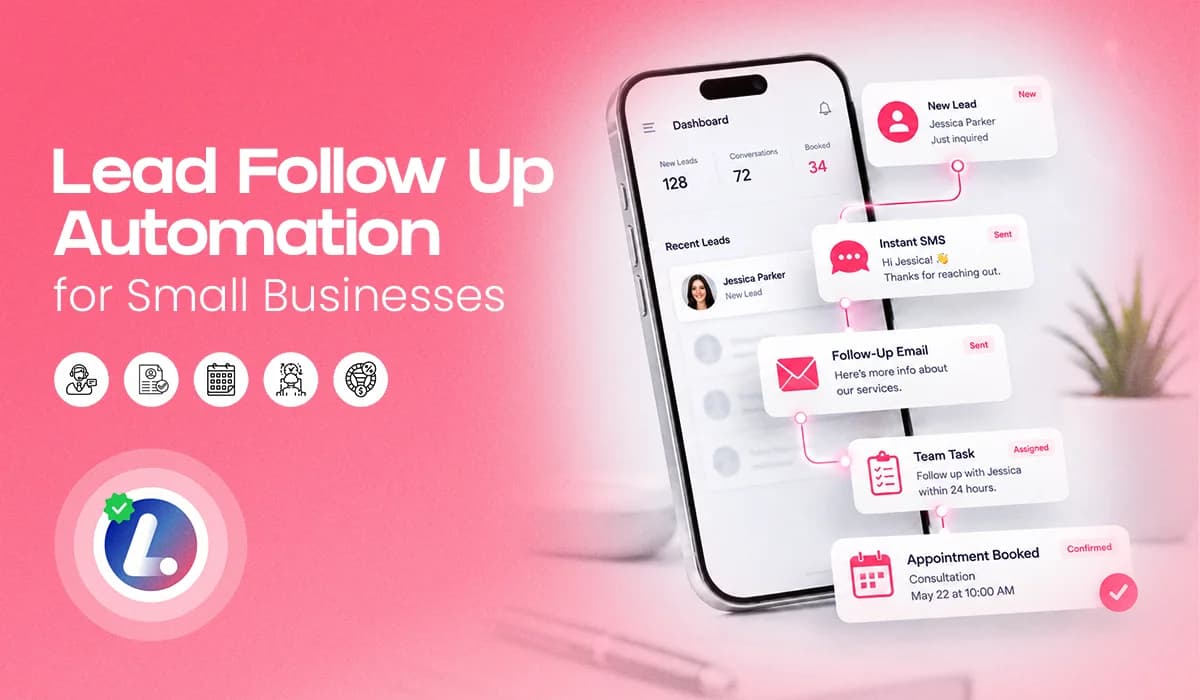

Most small businesses do not lose leads because people are not interested. They lose leads because the follow up is slow, inconsistent, or dependent on someone manually remembering what to do next.
A new inquiry comes in. The team is busy. A call is missed. A form submission sits for a few hours. Someone says, “I’ll follow up later,” and later becomes tomorrow. That is exactly where lead follow up automation helps. It gives your business a simple system to respond quickly, stay in touch, move leads through the right CRM pipeline stages, and keep opportunities from slipping away.
For appointment driven businesses like chiropractic clinics, dental practices, home services, wellness centers, and local franchises, follow up is not just a sales activity. It is part of the customer experience. In this guide, I’ll walk you through a practical lead follow up automation system you can build inside your CRM.
No fluff. No overcomplicated theory. Just a clear SOP, simple pipeline stages, follow up sequence examples, SMS and email templates, and a practical checklist your team can actually use.
What Lead Follow Up Automation Means In Plain English
Lead follow up automation means your CRM takes action when a new lead comes in. Instead of waiting for someone to manually reply, the system can send an instant SMS, send an email, create a task for your team, move the lead into the right pipeline stage, and continue follow up if the person does not respond.
For example, if someone fills out a website form, your CRM can immediately send a message like: “Hi Sarah, thanks for reaching out. We received your request. Would you prefer a morning or afternoon appointment?”
That message feels simple and human, but it can be automated. That is the balance you want.
Lead follow up automation is not about replacing your team. It is about supporting your team so every lead receives attention, even when your staff is busy, on another call, helping a customer, or away from the desk.
Why Manual Follow Up Breaks And Where Leads Leak
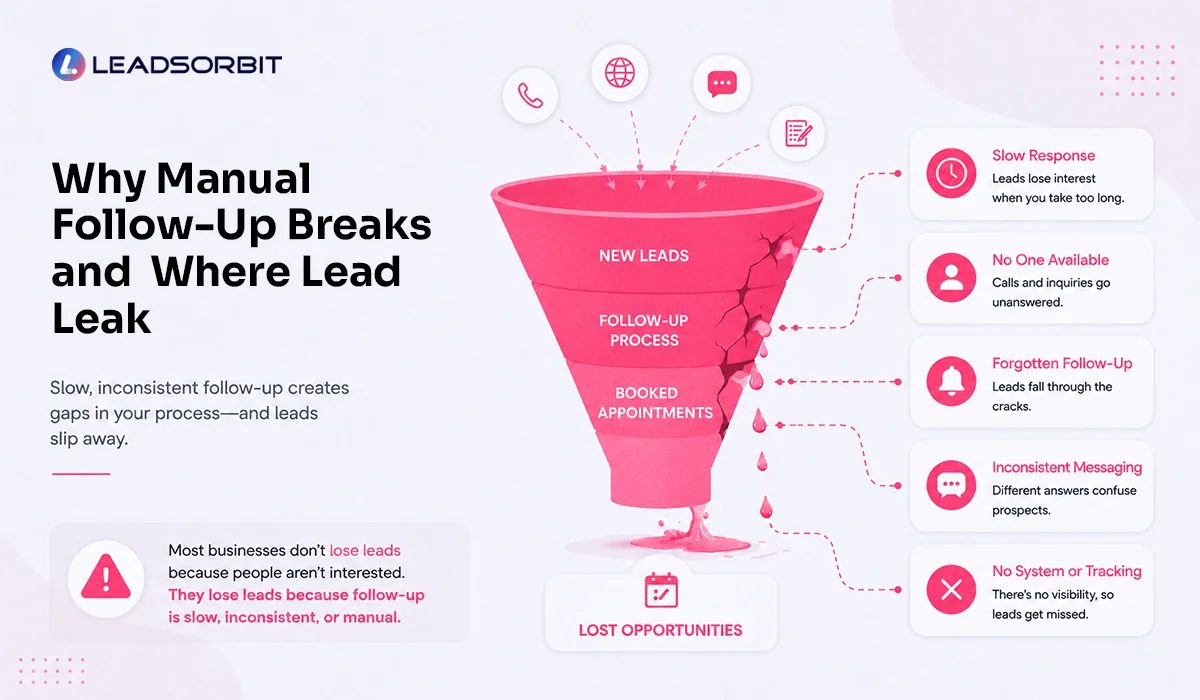
Manual follow up works when your business receives only a few inquiries. But once leads start coming from your website, ads, missed calls, Google Business Profile, social media, referrals, and landing pages, manual follow up becomes hard to control.
The problem is not always effort. Most teams are trying their best. The problem is that leads often live in too many places. One lead is on Facebook. One is in an inbox. One is in a spreadsheet. One left a voicemail. One started a chat. One called after hours.
When there is no central system, follow up becomes inconsistent.
The most common leaks are:
- New leads do not receive a fast first response.
- The team does not always know which lead is new, contacted, booked, or lost.
- Follow up stops after one call, one text, or one email.
For a small business, this creates a silent revenue leak.
You may be investing in ads, SEO, social media, referrals, and landing pages, but if the follow up process is weak, many of those leads never become appointments or customers.
That is why a marketing automation CRM is important. It gives your team one place to capture leads, continue conversations, and keep the next step clear.
The Follow Up System That Works
A good follow up system should be simple. If it is too complex, the team will not use it. If it is too loose, leads will still fall through the cracks. The goal is to build a system where every new lead gets a fast response, every conversation is visible, and every lead has a clear next step.
Here is the practical flow.
Capture Every Lead In One CRM
Your leads may come from website forms, missed calls, AI chat, paid ads, Google, referrals, and direct calls. The mistake is letting them live in different places.
Every inquiry should enter one CRM so your team has a single source of truth. Once the lead enters your CRM, Workflow AI can trigger the next steps automatically. That means no lead should sit unnoticed just because someone was busy.
Send The First Response Immediately
The first response should go out as soon as possible. It does not need to be long. It just needs to confirm that the request was received and make it easy for the lead to reply or book.
A simple message can say:

That small first response can change the experience completely. Instead of wondering whether anyone saw their request, the lead feels acknowledged.
Create A Task For The Team
Automation should support your team, not remove them from the process. For high intent leads, your CRM should create a task for someone to call, review the conversation, or confirm the appointment request.
- The automation handles speed.
- Your team handles the human touch.
That combination is where follow up becomes much stronger.
Move Leads Into The Right Stage
Every lead should have a status.Is the lead new? Contacted? Interested? Booked? Not responding? Not interested?
Without pipeline stages, your team is guessing. With clear CRM pipeline stages, your team can open the CRM and immediately see what needs attention.
Stop The Wrong Follow Up At The Right Time
This is one of the most important parts of automation. If someone books an appointment, they should not keep receiving sales follow up messages. Once a lead books, the system should move them into the appointment stage and begin reminder messages instead. Good automation should feel helpful, not robotic.
A simple system like this can be built quickly once your lead sources, pipeline stages, and messages are clear. To see how this workflow looks inside LEADSORBIT, you can Book a Demo.
Pipeline Stages You Actually Need
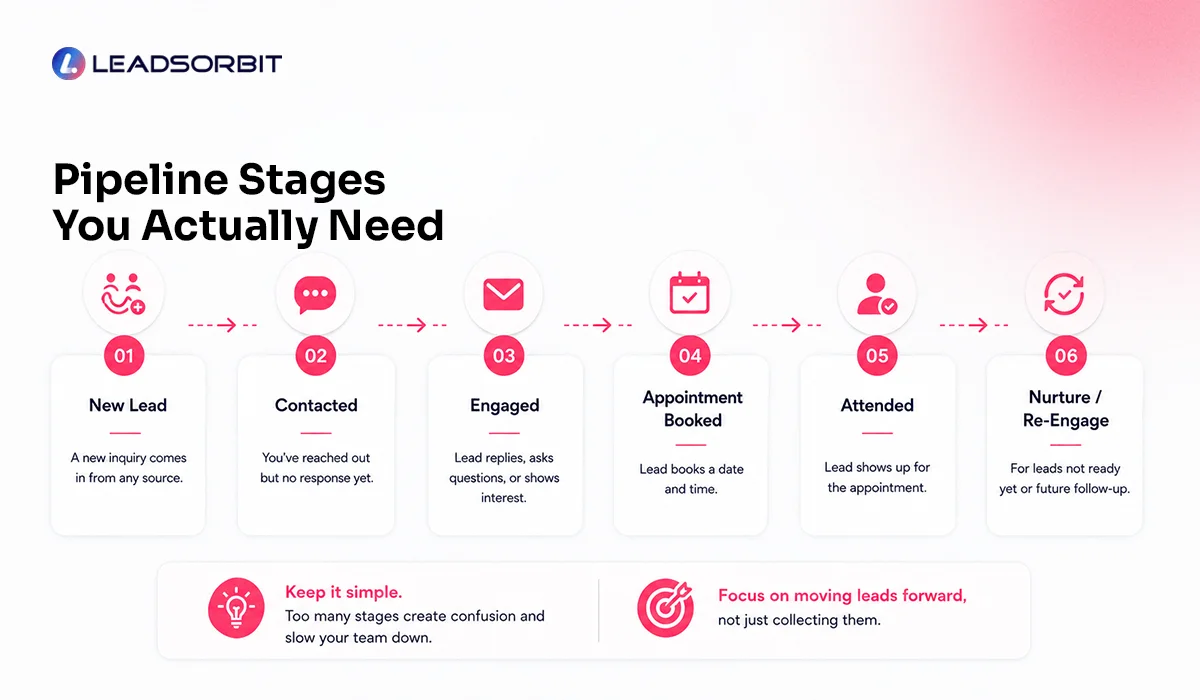
Your CRM pipeline should be simple enough for daily use. Many businesses make the mistake of creating too many stages. Then the team stops updating them.
For most small businesses, these stages are enough:
- New Lead
- Contacted
- Engaged
- Appointment Requested
- Appointment Booked
- No Response
- Long Term Follow Up
- Not Interested
- Converted
Think of these stages as the path a lead follows from first inquiry to final outcome. A new lead needs immediate attention. Once the first call, SMS, or email goes out, the lead becomes contacted. If the person replies or asks questions, they move into engagement.
From there, the next step is usually scheduling. Some leads will request an appointment right away. Others will need a little more help before they choose a time. Once the appointment is booked, the lead should move out of sales follow up and into appointment reminders. This keeps your messaging clean and avoids sending the wrong message at the wrong time.
If the lead does not respond, they should not sit in the pipeline forever. Move them into No Response first, then into Long Term Follow Up if they still do not reply. The purpose of these stages is not to make the CRM look organized. The purpose is to help your team know what to do next.
A Follow Up Sequence That Does Not Feel Spammy
A follow up sequence should not sound desperate. It should sound helpful.
People get busy. They miss texts. They forget to reply. They compare options. Sometimes they are interested, but not ready to book at that exact moment. Your sequence should make it easy for them to continue the conversation.
Here is a simple structure:
| Step | Channel | Purpose |
|---|---|---|
| Touch 1 | SMS | Confirm the inquiry and invite a reply |
| Touch 2 | Provide more detail and booking option | |
| Touch 3 | SMS | Check in politely |
| Touch 4 | Team Call Task | Add human follow up |
| Touch 5 | Answer hesitation and offer help | |
| Touch 6 | SMS | Ask whether to keep the request open |
| Touch 7 | CRM Update | Move to long term nurture if no response |
This kind of sequence works because it is not only one message. It gives the lead multiple chances to respond, while also giving your team structure. The key is to stop or adjust the sequence when the lead replies, books, or clearly says they are not interested.
Templates For SMS And Email Follow Up
Templates are helpful, but they should not make your business sound robotic. Use these as your base. Adjust the language to match your brand, industry, and customer type.
SMS Template 1: New Lead
SMS Template 2: No Response Follow Up
SMS Template 3: Booking Link
SMS should stay short. The goal is to restart the conversation, not explain everything in one message.
Email Template 1: Inquiry Confirmation
Hi {{first_name}},
Thank you for reaching out to {{business_name}}.
We received your request and our team will be happy to help. You can reply to this email with any questions, or use the link below to choose a time that works best for you.
{{booking_link}}
Thank you,
{{business_name}} Team
Email Template 2: Follow Up After No Reply
Hi {{first_name}},
I wanted to follow up on your recent request. Are you still looking to schedule an appointment or speak with someone from our team? You can reply here with any questions, or use this link to book directly:
{{booking_link}}
Thank you,
{{business_name}} Team
Email gives you a little more room than SMS, but it should still stay clear and easy to act on. Do not over template your messaging. The best follow up sounds like a helpful team member wrote it.
Nurture For Unbooked Leads Without Chasing
Not every lead will book right away. Some people are comparing options. Some need to talk to a spouse, parent, office manager, or business partner. Some are interested, but the timing is not right.
This is where lead nurturing automation helps. Instead of marking these leads as lost too early, you can move them into a longer term follow up flow.
For example, a dental practice may have a lead interested in implants but not ready to schedule. A chiropractic clinic may have someone who asked about back pain but did not book. A home service business may have someone comparing estimates.
In all of these cases, daily chasing is not the answer. The better approach is light, helpful nurturing. That may include an educational email, a reminder about the service, a review highlight, a seasonal offer, or a simple check in after some time.
For appointment based businesses, LEADSORBIT also supports industry specific workflows for chiropractic businesses and dental practices, where follow up, reminders, and patient communication are directly connected to booked appointments.
The goal is simple: Stay visible without becoming annoying.
How LEADSORBIT Helps With Follow Up Automation
LEADSORBIT helps small businesses capture, follow up, and convert leads from one AI powered CRM. For lead follow up automation, the value is simple.
Your leads come into one place. Your workflows start automatically. Your conversations stay organized. Your team can see the next step. Your AI Employee can help respond, qualify, and guide leads when your team is busy.
Workflow AI helps automate the steps that happen after a lead enters your CRM. You can create workflows for new lead follow up, missed call text back, appointment reminders, no response follow up, lead nurturing, rebooking, review requests, and internal team tasks.
Conversation AI helps your team manage conversations across channels. Follow up is not only about sending messages. It is about continuing the conversation. When SMS, email, chat, calls, and social messages are scattered, leads get missed. When conversations are centralized, your team can respond with more confidence.
AI Employee helps your business respond faster, answer common questions, guide leads, and support follow up when your team is unavailable. For small businesses, this is valuable because your staff cannot be everywhere at once.
Together, these tools help keep leads moving while your team focuses on higher value conversations.
Quick Start Checklist
Use this checklist before launching your lead follow up automation.
Capture
- Connect all lead sources to your CRM.
- Create a simple lead pipeline.
- Track where each lead came from.
- Test every form, chat, and booking path.
Follow Up
- Write one instant SMS for new leads.
- Write one confirmation email.
- Add a no response follow up message.
- Add a booking link where relevant.
- Create a call task for high intent leads.
Control
- Stop sales follow up when a lead books.
- Move unresponsive leads into long term nurture.
- Review open leads daily.
- Test the full workflow before going live.
This is enough to get started. You can always improve the workflow later. The first goal is not perfection. The first goal is consistency.
Simple Daily SOP For Your Team
Automation works best when your team also follows a simple routine.
Here is a daily SOP your team can use:
- Open the CRM at the start of the day.
- Review all new leads.
- Check open conversations.
- Call high intent leads first.
- Move each lead to the correct pipeline stage.
- Confirm booked appointments.
- Review leads in the No Response stage.
- Moving cold leads to Long Term Follow Up.
- Check missed calls before the end of the day.
This routine keeps the system clean. It also makes sure automation and human follow up are working together.
New Lead Follow Up Workflow Template
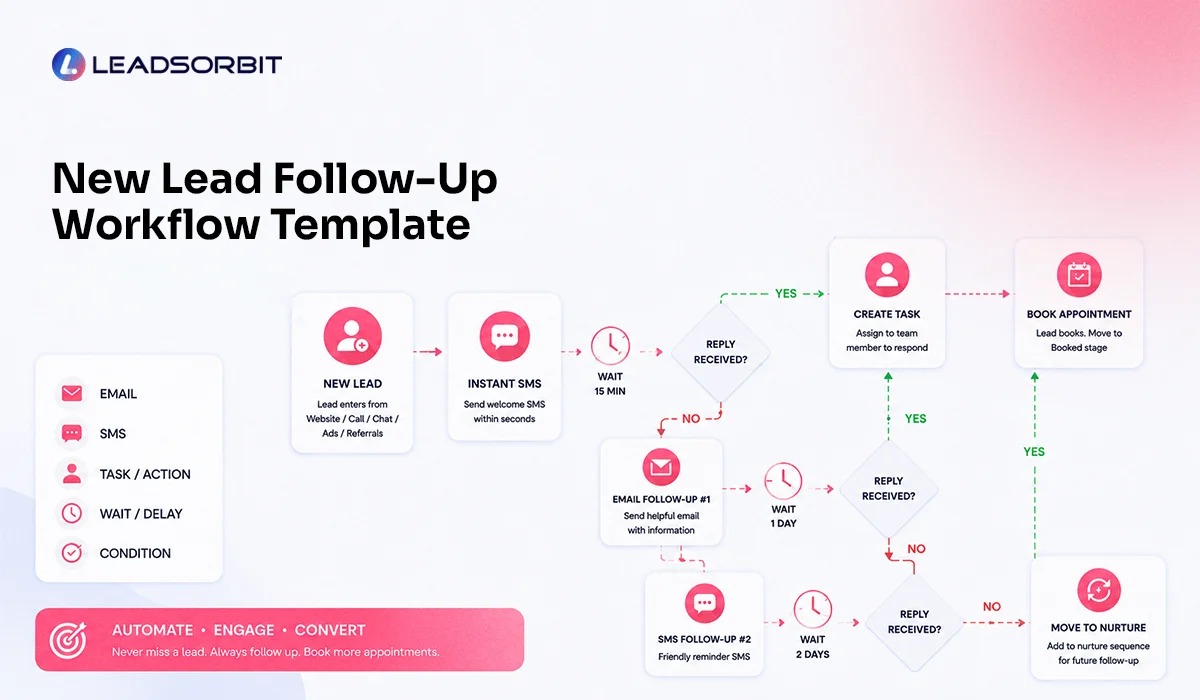
Here is the simplest workflow I recommend starting with. Do not try to automate everything on day one. Start with the new lead journey first because this is where most businesses lose speed and consistency. Once this workflow is working well, you can build more advanced automations for missed calls, appointment reminders, reactivation, reviews, and long term nurturing.
Trigger: A new lead enters from a form, chat, ad, call, or manual entry.
- Step 1: Send an instant SMS so the lead knows their request was received.
- Step 2: Send a confirmation email with a clear next step or booking link.
- Step 3: Create a team task so a real person can review or call the lead if needed.
- Step 4: Wait for the lead to reply, book, or remain inactive.
- Step 5: If the lead replies, notify the team and pause the general follow up sequence.
- Step 6: If the lead books, move them to Appointment Booked and start reminder automation.
- Step 7: If there is no response, continue the follow up sequence.
- Step 8: If there is still no response after the full sequence, move the lead to Long Term Follow Up.
This workflow is simple, but it covers the most important part of follow up: making sure every lead has a next step.
Try LEADSORBIT free for 14 days
FAQs About Lead Follow Up Automation
Lead follow up automation is the use of CRM workflows to automatically respond to new leads, send SMS and email follow ups, create team tasks, move leads through pipeline stages, and continue nurturing leads until they book, reply, or become inactive.
Final Thoughts
Here is the practical takeaway:
- Lead follow up automation is not about sending more messages. It is about building a better system.
- A system where every lead is captured. Every inquiry gets a response. Every team member knows the next step. Every opportunity is visible. And every customer feels like your business is paying attention. For small businesses, this can be the difference between missed opportunities and booked appointments.
- Start simple. Automate the first response. Organize your pipeline. Add SMS and email follow up. Create team tasks. Move unresponsive leads into nurture. Once the system is working, you can improve it step by step. If you want to see how LEADSORBIT can help you automate your lead follow up, manage conversations, and build workflows for your business, you can book a demo

Start Your Free 14 Day Trial
Try LEADSORBIT and see how it captures missed calls, follows up instantly, and turns leads into booked appointments for your business.
Personal Message from Faisal Zulfiqar
At LEADSORBIT, we see follow up as part of the customer journey. When someone reaches out to your business, they are showing interest. The faster and more consistently you respond, the better their experience becomes.
My recommendation is simple: do not wait until leads are already lost to fix your follow up. Build the system now, keep it simple, and let automation support your team every day.