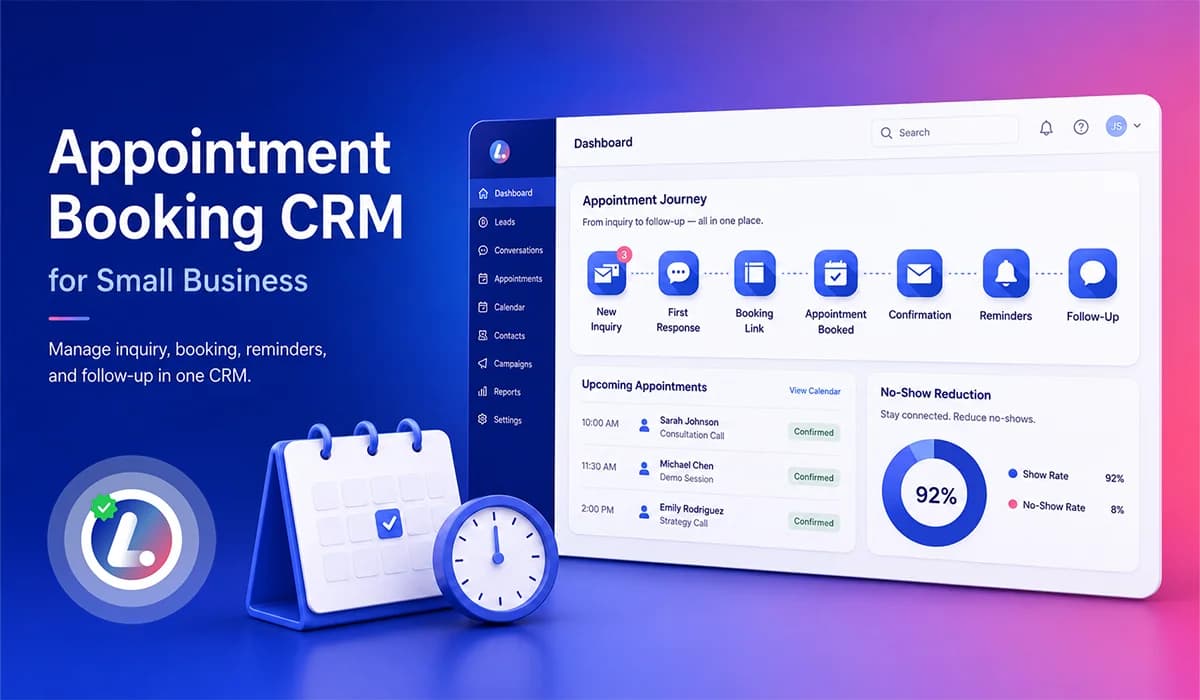

An appointment booking CRM for small business is not just a calendar link. It is the system that helps your team capture appointment requests, respond quickly, share the right booking option, confirm the appointment, send reminders, and follow up if the person does not book or does not show up.
For many service businesses, appointment problems do not happen because the team is careless. They happen because the booking process is split across forms, calls, messages, calendars, spreadsheets, and manual reminders. When the process is disconnected, even good leads can disappear before they become booked appointments.
That is why appointment booking should be connected to your CRM. A strong AI powered CRM should help your business manage the full appointment journey from first inquiry to confirmed visit, while also keeping conversations and follow up organized in one place.
In this guide, I will walk through what an appointment booking CRM should manage, why basic scheduling tools are often not enough, how reminders and confirmations help reduce no shows, and how small businesses can build a cleaner booking process without making the team's daily work more complicated.
What Is an Appointment Booking CRM?
An appointment booking CRM is a customer relationship system that connects scheduling with lead capture, conversations, follow up, reminders, and pipeline visibility. Instead of treating appointment booking as a separate calendar feature, it treats booking as part of the full customer journey.
This matters because most appointment based businesses do not only need someone to pick a time. They need to know where the appointment request came from, whether the lead received a response, whether the person booked, whether reminders were sent, and what should happen if the person cancels, reschedules, or misses the appointment.
A practical appointment booking CRM should help manage:
- Lead capture from forms, calls, chat, ads, and manual entries
- Online appointment booking and booking links
- Calendar availability and appointment creation
- SMS and email confirmations
- Appointment reminder texts and reschedule options
- No show follow up and long term nurture
- CRM pipeline stages for appointment status
- Team tasks, notifications, and ownership
- Conversation history across channels
The goal is not only to book more appointments. The goal is to create a cleaner process where leads, customers, and team members all understand the next step.
Appointment Booking CRM vs Basic Scheduling Software
Basic scheduling software can help someone choose a time on a calendar. That is useful, but it does not always solve the bigger operational problem for a small business. The real issue is usually what happens before and after the booking.
A lead may ask a question before scheduling. A patient may request an appointment after hours. A customer may click a booking link but not complete the process. Someone may book and then forget to show up. A simple calendar tool may record the appointment, but it may not manage the conversation, follow up, reminders, and CRM stage movement around that appointment.
| Area | Basic Scheduling Tool | Appointment Booking CRM |
|---|---|---|
| Main purpose | Let people pick a time | Manage the full journey from inquiry to follow up |
| Lead capture | Often limited to booking form only | Connects forms, calls, chat, ads, and manual leads |
| Conversations | Usually separate from scheduling | Keeps SMS, email, chat, and call context connected |
| Follow up | May send basic reminders | Can trigger workflows based on status, replies, and booking behavior |
| Pipeline visibility | Limited or missing | Shows where each lead or appointment stands |
| Team ownership | Often manual | Can create tasks, alerts, and stage based responsibilities |
This is the reason small businesses should think beyond the calendar. A scheduling tool may be enough for a very simple process, but a CRM becomes more valuable when leads come from multiple sources and the team needs better control over follow up.
Why Small Businesses Lose Appointments
Small businesses lose appointments when the booking process has too many gaps. Sometimes the lead is interested, but the business responds too slowly. Sometimes the customer wants to book, but the next step is unclear. Sometimes an appointment is booked, but the reminder process is weak.
These gaps become more visible when your business depends on phone calls, website forms, ad leads, chat messages, and staff availability at the same time. Without one connected system, the team has to remember too much manually.
Common reasons appointments get lost include:
- Slow first response after a new inquiry comes in
- Phone tag between the customer and the team
- No clear booking link or scheduling option
- Appointment requests sitting in email, chat, or missed calls
- No reminder workflow after the appointment is booked
- Booked customers still receiving sales follow up messages
- No clear process for reschedules, cancellations, or no shows
- Managers not being able to see stuck appointment opportunities
These are not only people problems. Most of the time, they are system problems. When the CRM, calendar, inbox, and workflows are disconnected, the team can easily miss the next step even when everyone is trying to do the right thing.
The Full Appointment Booking Journey
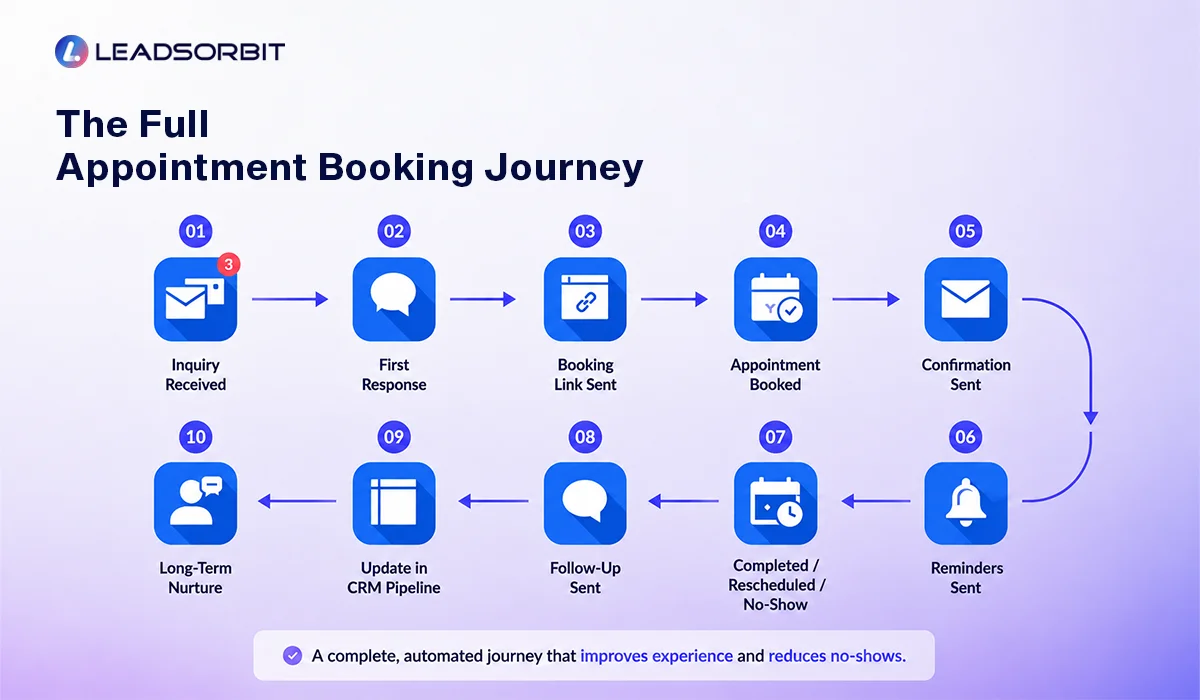
A strong appointment booking CRM should make the full journey visible. This journey starts before someone books and continues after the appointment is confirmed. If the journey is not mapped clearly, your team may not know what should happen next.
For most appointment based small businesses, the journey can be kept simple. The CRM should show each stage, trigger the right action, and make it easy for the team to step in when a real conversation is needed.
| Journey Stage | What Happens | CRM Action |
|---|---|---|
| New inquiry received | A lead comes from a form, call, chat, ad, or manual entry | Create or update the contact record and notify the team |
| First response sent | The lead receives an SMS, email, or call attempt | Start the booking conversation and track the response |
| Booking link shared | The customer gets a direct scheduling option | Record the message and monitor whether booking happens |
| Appointment requested | The lead asks for a time, service, or consultation | Move the lead into a high intent appointment stage |
| Appointment booked | The appointment is confirmed on the calendar | Stop sales follow up and start appointment workflows |
| Confirmation sent | The customer receives date, time, location, and next steps | Log the confirmation and allow reply based updates |
| Reminder workflow started | The system sends reminders before the appointment | Track confirmations, reschedules, and replies |
| Completed, rescheduled, or missed | The appointment outcome is known | Move the contact to the correct next stage |
| Follow up or nurture started | The team follows up based on the outcome | Start review requests, rebooking, no show recovery, or nurture |
This type of journey gives the team a shared operating system. Instead of guessing where a lead stands, everyone can see the status, the last action, and the next step.
Online Appointment Booking: Make It Easy to Schedule
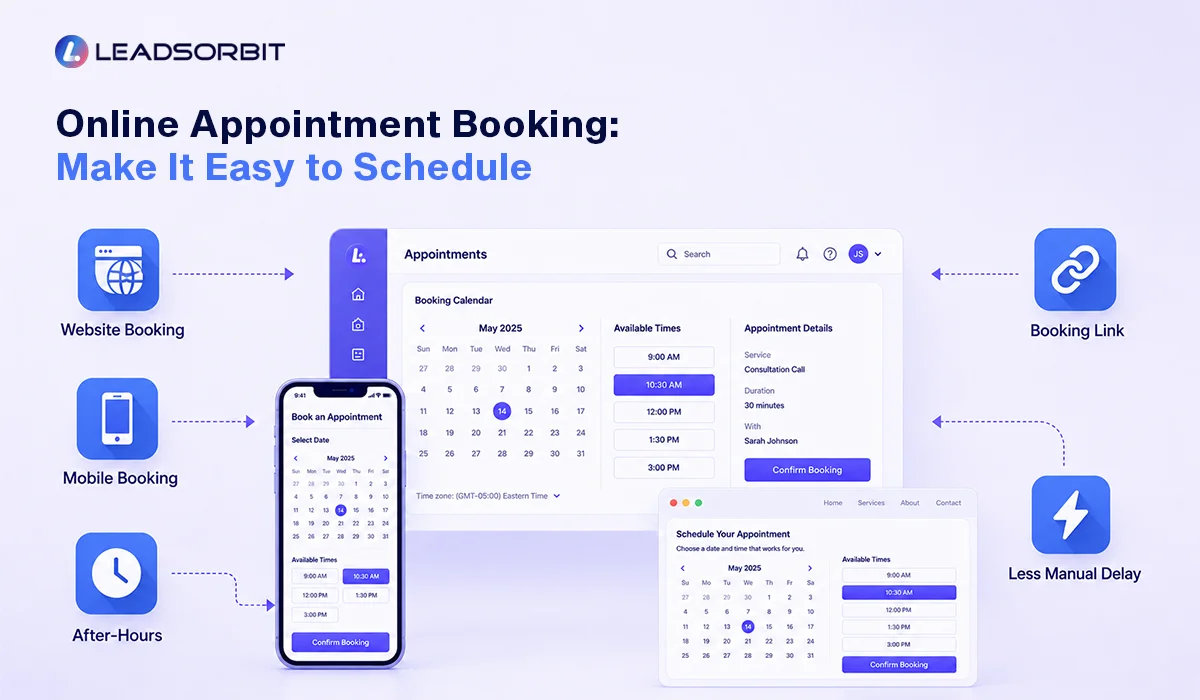
Online appointment booking helps customers take action when they are ready. A person may visit your website at night, click an ad during lunch, or search for your business on their phone. If the only option is to call during business hours, some interested leads will not take the next step.
This does not mean every business should allow every appointment type to be booked without review. It means the customer should have a simple way to request or schedule the next step without friction. Booking links, website forms, and calendar based scheduling can all support that process when they connect back to the CRM.
Google also allows eligible businesses to manage local business links, including booking links, from a Business Profile, which means your scheduling experience may start before someone even reaches your website. You can review Google Business Profile booking links if your team wants to understand that option.
A useful online booking setup should include:
- A clear booking button on the website
- Mobile friendly scheduling pages
- Direct booking links in SMS and email follow up
- After hours appointment request options
- Simple appointment type selection
- Confirmation after the customer books or requests a time
- CRM tracking so the team can see whether the lead completed the booking
Online booking works best when it is connected to the rest of the customer journey. If the booking tool is separate from the CRM, the team may still have to manually check whether the person booked, replied, rescheduled, or needs help.
Appointment Confirmations and Reminder Texts
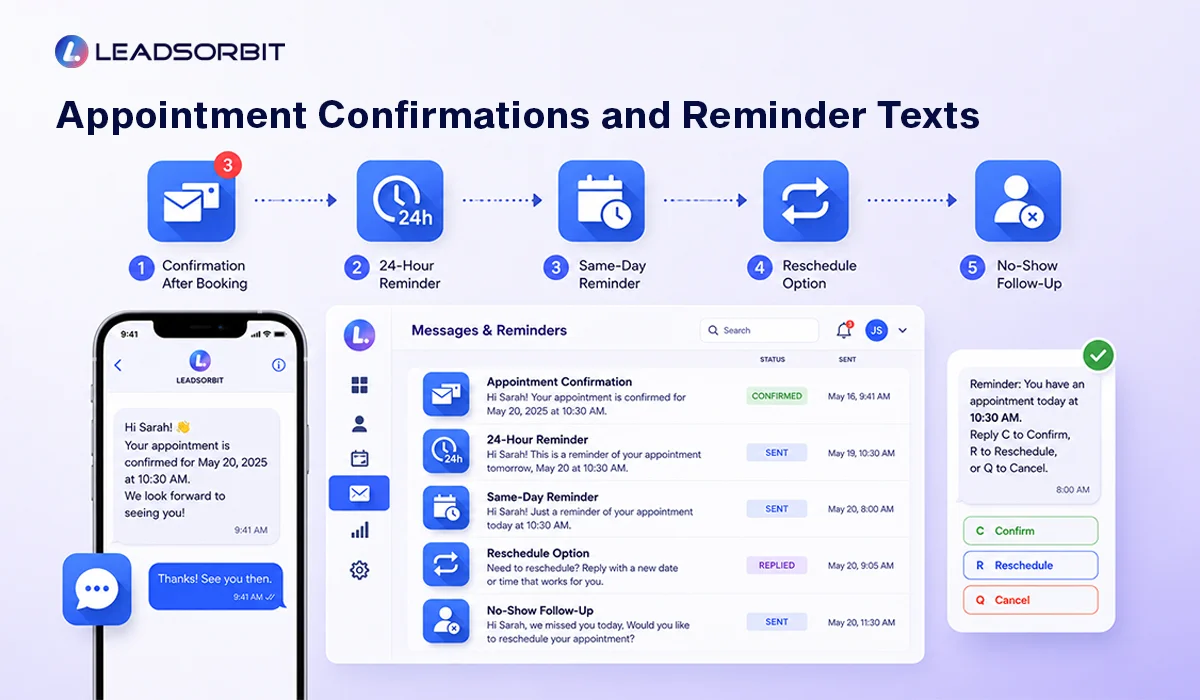
Booking the appointment is only one part of the process. After someone books, your business still needs to confirm the details, remind the person at the right time, and make it easy to reply if they need to reschedule.
For chiropractic and dental teams, appointment reminders should also be handled with care because these businesses may deal with patient related communication. The U.S. Department of Health and Human Services says appointment reminders are considered part of treatment and can be made without authorization under the HIPAA Privacy Rule, but businesses should still follow applicable privacy, consent, and communication rules for their situation. You can review the official HHS guidance on appointment reminders for more detail.
A simple reminder flow may include:
- Immediate confirmation after booking
- Reminder 24 hours before the appointment
- Same day reminder with time and location
- Simple reply option to confirm or reschedule
- No show follow up if the person misses the appointment
Here is a simple example of a reminder text your team can adapt:

Reminder messages should be clear, short, and helpful. The goal is not to overwhelm the customer. The goal is to reduce confusion and make it easy for the person to keep the appointment or request a better time.
How an Appointment Booking CRM Helps Reduce No Shows
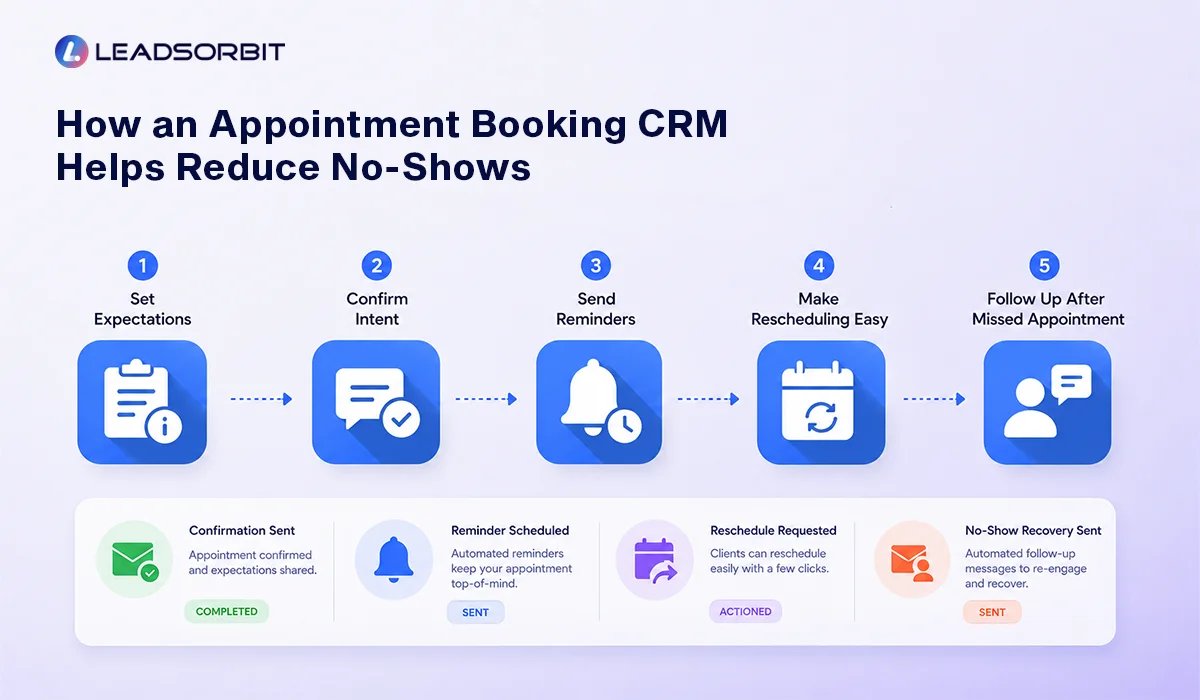
No show reduction is not only about sending one reminder. A person may miss an appointment because they forgot, misunderstood the details, could not find the location, needed to reschedule, or never felt fully committed to the time.
A CRM helps reduce these gaps by connecting appointment confirmation, reminder timing, reschedule options, staff visibility, and follow up after a missed appointment. This makes no show reduction a process instead of a last minute task.
A CRM helps reduce these gaps by connecting appointment confirmation, reminder timing, reschedule options, staff visibility, and follow up after a missed appointment. This makes no show reduction a process instead of a last minute task.
A practical no show reduction system should include:
- Clear confirmation immediately after booking
- Reminder messages before the appointment
- Easy reschedule option instead of forcing a no show
- Team visibility into unconfirmed appointments
- Staff task for high value or high risk appointments
- No show follow up after a missed appointment
- CRM stage update so the record stays accurate
This process helps the business act earlier. If someone does not confirm, the team can follow up. If someone needs to reschedule, the system can make that easier. If someone misses the appointment, the CRM can trigger a respectful recovery message instead of letting the opportunity disappear.
Automated Appointment Scheduling Behind the Scenes
Automated appointment scheduling is what happens behind the scenes when a lead shows interest, receives a booking link, selects a time, or needs follow up. The customer may only see a simple message or calendar page, but the CRM should handle several operational steps in the background.
This is where AI Appointment and Workflow AI can support the team. The system can help connect the booking action with the right CRM stage, confirmation message, reminder workflow, and team notification.
Behind the scenes, a good appointment workflow can:
- Send a booking link after a new inquiry
- Check calendar availability or route the customer to the right booking option
- Create or update the appointment record
- Move the lead from active sales follow up into appointment booked
- Send a confirmation message
- Start reminder workflows
- Notify the team when action is needed
- Pause unrelated follow up after the appointment is booked
Automation should support the team, not replace judgment. If the lead asks a detailed question, the system should make that visible so a real person can help. If the lead books, automation should protect the customer experience by stopping the wrong messages and starting the right reminders.
How Conversations Connect to Appointment Booking
Appointment booking is not only a scheduling action. It is often a conversation. A lead may ask about availability, pricing, appointment types, insurance, location, preparation, or what to expect during the first visit.
If those conversations are scattered across SMS, email, chat, and call notes, the team may not have the context needed to respond properly. This can create repeated questions, missed details, and a weaker customer experience.
Conversation AI helps support this part of the journey by keeping appointment related conversations organized. When the team can see the previous messages, booking status, and next step in one place, the follow up becomes more confident and consistent.
A connected conversation view helps your team answer questions faster, avoid repeated work, and understand whether the person is ready to book, already booked, needs help rescheduling, or should be moved into follow up.
What to Look for in an Appointment Booking CRM
If you are comparing appointment booking CRM options, do not only look at the calendar page. Look at whether the system can support your real booking process from first inquiry to follow up.
A good system should be simple enough for the team to use every day, but strong enough to reduce manual gaps. The right CRM should connect appointment booking with communication, workflows, reminders, and visibility.
Use this checklist when evaluating your setup:
- Can new inquiries enter the CRM automatically?
- Can the system send booking links by SMS and email?
- Can appointment status be tracked inside the pipeline?
- Can confirmations and reminders be automated?
- Can customers reply to confirm or reschedule?
- Can the team see appointment related conversations in one place?
- Can no show follow up be triggered automatically?
- Can managers see unbooked, unconfirmed, and missed opportunities?
- Can workflows pause when someone books or replies?
- Can the system support multiple locations or providers if needed?
This checklist keeps the buying decision practical. The best appointment booking CRM is not always the one with the longest feature list. It is the one that makes the booking journey easier for your customers and easier for your team to manage.
1. Chiropractic Example
A chiropractic office may receive a new patient inquiry from a website form, missed call, or ad campaign. The person may be asking about back pain, availability, or the first visit process. If the team cannot respond quickly, the lead may keep searching.
With a connected appointment booking CRM, the inquiry enters the CRM, the first response is sent, and the lead receives a booking option. If the person books, the system sends confirmation and reminder texts. If the person does not respond, the follow up sequence can continue and the team can be notified when personal attention is needed.
This type of process is especially useful for appointment driven chiropractic teams. A dedicated Chiropractic Software setup should help the clinic keep appointment requests, conversations, reminders, and follow up visible instead of relying only on manual tracking.
2. Dental Example
A dental practice may receive a consultation request after hours. The patient may want to ask about appointment options, treatment questions, or how to schedule the next step. If the request sits until the next business day without a response, the practice may lose momentum.
A connected CRM can send an immediate acknowledgment, share the right booking option, and organize the conversation for the team. Once the appointment is booked, reminder workflows can start automatically, and any reply about rescheduling can stay attached to the patient's conversation history.
For dental teams, the goal is not to make communication robotic. A good Dental Software workflow should make the patient journey easier while helping the front desk manage appointment requests, reminders, and follow up more consistently.
When Human Follow Up Still Matters
Automation can manage timing, routing, reminders, and repeatable follow up, but some appointment conversations still need a human response. A good appointment booking CRM should make those moments easier to see instead of hiding them inside automated activity.
For example, a lead may ask which appointment type is right, whether a specific provider is available, what to bring to the first visit, or whether a certain treatment is a fit. These moments should not be handled blindly by a generic sequence. The CRM should alert the team, show the conversation history, and make the next action clear.
Human follow up matters most when:
- The lead asks a detailed question before booking
- The customer requests a specific provider or appointment type
- The person clicks a booking link but does not complete the booking
- The appointment is high value or urgent
- The customer replies with confusion about time, location, or next steps
- A no show needs a respectful recovery conversation
This is the balance small businesses should aim for. Let automation handle the repetitive steps, but make sure the team is notified when a real conversation can move the appointment forward.
Common Mistakes to Avoid
Even good appointment tools can fail if the process around them is weak. The mistake is usually not that the business picked the wrong calendar. The mistake is that the booking process was never connected to follow up, conversations, pipeline stages, and team ownership.
Before adding more tools, review the gaps that usually create appointment friction. Fixing these basics often improves the customer experience faster than adding another disconnected platform.
Common appointment booking CRM mistakes include:
- Sending a booking link without tracking whether the person booked
- Using reminders without an easy reschedule option
- Letting booked appointments stay in an active sales follow up sequence
- Keeping SMS, email, chat, and call notes in separate places
- Not assigning ownership for unconfirmed or no response appointments
- Treating no shows as lost instead of triggering recovery follow up
- Choosing tools based on feature lists instead of the real booking journey
A clean CRM process should reduce these mistakes. Every appointment request should have a status, every booked appointment should have a reminder flow, and every missed appointment should have a respectful next step.
What Should Happen After the Appointment
The appointment journey does not end when someone arrives. After the appointment, your CRM should help the team move the contact into the right next stage. This keeps the record clean and makes future follow up easier.
For some businesses, the next step may be a review request. For others, it may be a rebooking reminder, a follow up message, a treatment plan conversation, or a long term nurture workflow. The right next step depends on the outcome of the appointment.
After the appointment, the CRM can help with:
- Marking the appointment as completed, rescheduled, cancelled, or missed
- Sending a thank you or next step message
- Triggering a review request when appropriate
- Creating a rebooking or follow up task
- Moving the contact into a nurture stage if they are not ready
- Keeping the conversation history connected for future visits
This final step is important because appointment booking should support the full customer relationship, not only the first visit. When the follow up continues properly, the CRM becomes a long term growth system instead of just a scheduling tool.
How LEADSORBIT Supports Appointment Booking CRM
LEADSORBIT is built to help small businesses connect appointment booking, conversations, workflows, and follow up inside one system. Instead of treating scheduling as a separate tool, LEADSORBIT helps your team manage the full appointment journey from inquiry to booked appointment and beyond.
With AI Appointment, businesses can support appointment scheduling, booking links, and appointment related workflows. With Workflow AI, teams can automate confirmations, reminders, no show follow up, stage movement, and task creation. With Conversation AI, appointment related messages can stay organized across channels.
LEADSORBIT can help your team:
- Respond faster when new appointment requests come in
- Share booking links through SMS, email, and other conversations
- Keep appointment status visible inside the CRM
- Automate confirmations, reminders, and no show follow up
- Give team members clearer ownership of appointment related tasks
- Keep the customer journey connected from first inquiry to follow up
If you want to see how LEADSORBIT can help your business connect appointment booking, reminders, conversations, and workflows, you can Book a Demo.
Try LEADSORBIT free for 14 days
FAQs About Appointment Booking CRM
An appointment booking CRM is a system that connects scheduling with lead capture, customer conversations, reminders, follow up, and CRM pipeline visibility. It helps your team manage the full journey from appointment request to booked appointment and follow up.
Final Thoughts
Appointment booking is not only about placing a calendar link on your website. For small businesses, booking is part of a larger journey that starts when someone shows interest and continues through confirmation, reminders, rescheduling, completion, and follow up.
When this journey is disconnected, leads can get lost, appointments can be missed, and teams can spend too much time chasing details manually. When the journey is connected inside a CRM, your team can see what happened, what needs attention, and what should happen next.
A strong appointment booking CRM should help your business capture inquiries, respond quickly, share booking options, confirm appointments, send helpful reminders, reduce no shows, and organize appointment related conversations. It should make the process easier for customers and clearer for the team.
Start with the basics. Make it easy to book. Confirm every appointment. Send reminders at the right time. Give people a simple way to reschedule. Track appointment status inside the CRM. Then use automation to support the repeatable steps without losing the human touch.
To see how LEADSORBIT can help your business connect appointment booking, reminders, conversations, and workflow automation in one CRM, you can Book a Demo.

Start Your Free 14 Day Trial
Try LEADSORBIT and see how it captures missed calls, follows up instantly, and turns leads into booked appointments for your business.
Personal Message from Faisal Zulfiqar
Appointment booking should feel simple for the customer and clear for the team. When the process is connected properly, your business does not have to depend only on memory, manual reminders, or disconnected tools.
My recommendation is to treat appointment booking as a complete journey, not a single calendar action. Capture the inquiry, respond quickly, guide the person to the right next step, confirm the appointment, remind them respectfully, and keep the conversation organized.
That is the kind of system that helps a small business follow up with more confidence and create a better experience from the first inquiry.