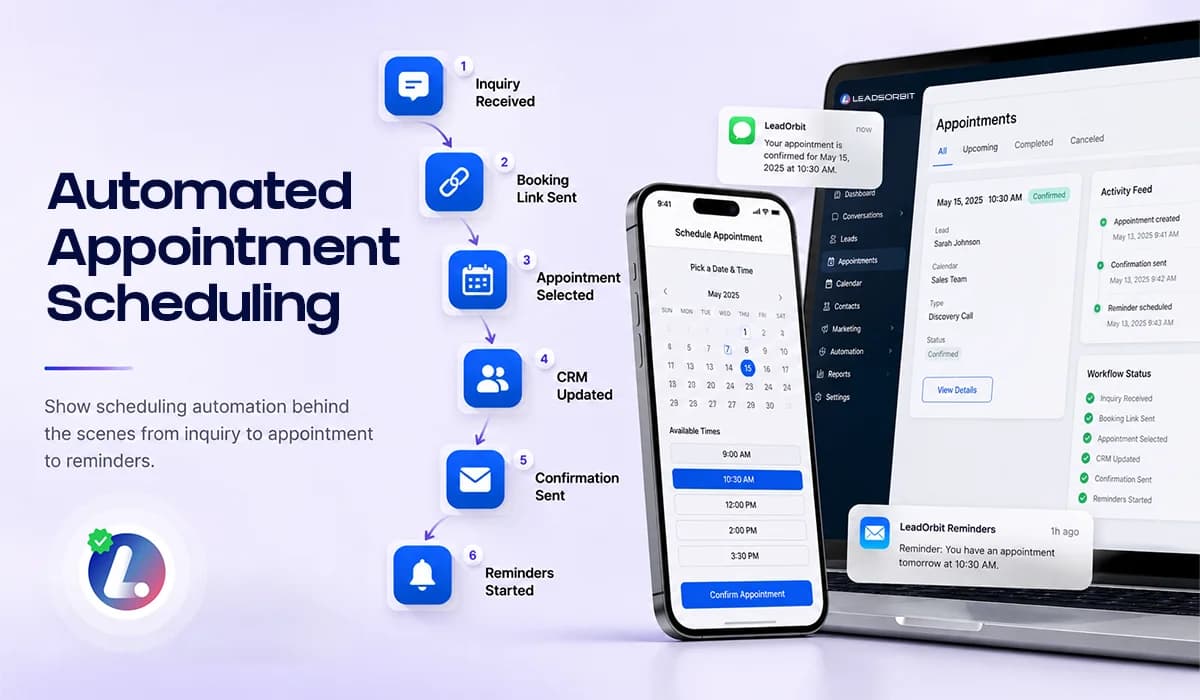

Automated appointment scheduling helps small businesses move a lead from interest to appointment without forcing the team to manually manage every step. It connects booking links, calendar availability, confirmations, reminders, CRM stages, and team tasks.
The goal is not to remove people from the process. The goal is to automate repeatable scheduling steps so the team can focus on real conversations, customer questions, and higher value follow up.
This guide explains what should happen behind the scenes when appointment scheduling is automated. It supports the larger Appointment Booking CRM for Small Business pillar and connects closely with AI Appointment and Workflow AI.
What Automated Appointment Scheduling Means
Automated appointment scheduling is more than letting someone pick a time on a calendar. A full scheduling workflow should update the CRM, notify the team, send confirmations, trigger reminders, and adjust follow up based on what the lead does.
For small businesses, this is important because scheduling usually touches multiple parts of the operation. A lead comes from a form, chat, call, ad, or website. The team needs to know what happened, and the customer needs a clear next step.
- Booking link sent to the lead.
- Calendar availability checked or appointment request captured.
- Appointment created or routed for team review.
- CRM stage updated automatically.
- Confirmation and reminder workflows started.
- Sales follow up paused or adjusted after booking.
- Team notified when human help is needed.
This is where automation becomes useful. It turns scheduling from a manual task into a connected workflow.
Why Manual Scheduling Breaks Down
Manual scheduling works when lead volume is low and the team has enough time to respond quickly. As the business grows, the process becomes harder to control. Leads come from more channels, staff get busy, and follow up depends on memory.
The result is often a slow customer experience. A person asks for a time, waits for a reply, misses the call, receives another message, and the business loses momentum.
- Leads wait too long for available times.
- Staff have to check calendars manually.
- Booking links are sent late or not sent at all.
- Appointments are created without clear CRM updates.
- Reminders are inconsistent.
- The team does not know which leads need help.
Automated scheduling is not about making the process more complex. It is about removing avoidable delays so the customer can book faster and the team can stay organized.
The Automated Scheduling Workflow
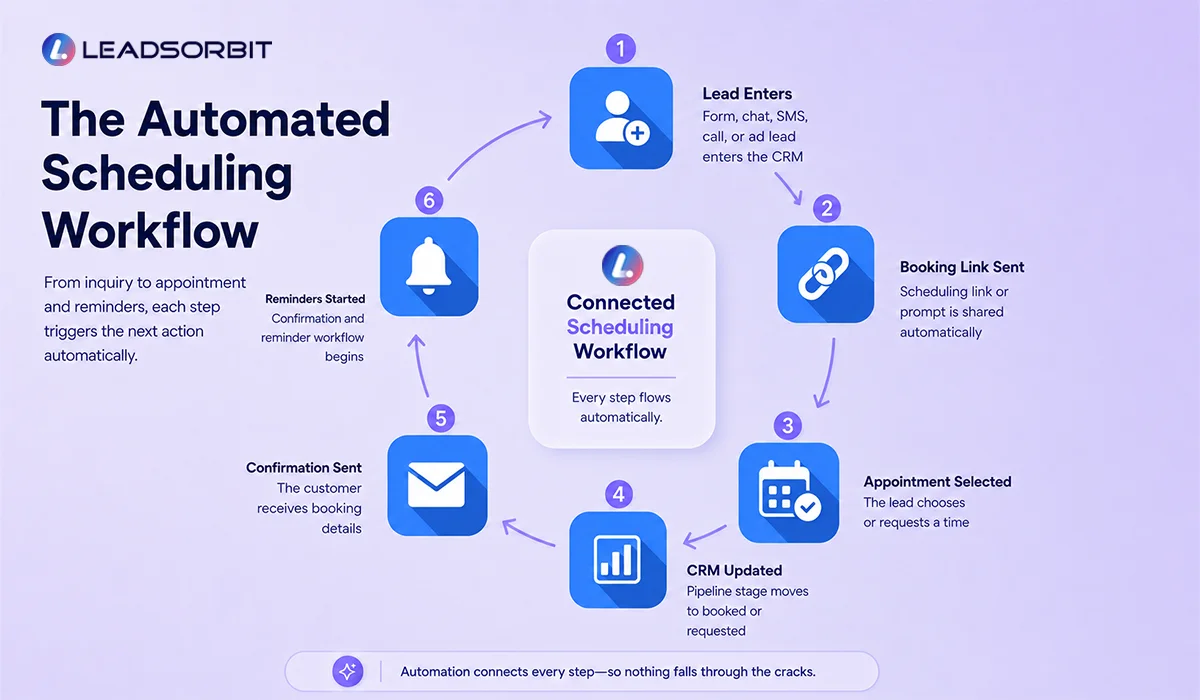
A strong scheduling workflow should follow a clear path from inquiry to booked appointment. Each step should trigger the right action without creating confusion for the team or customer.
| Step | What Happens | Automation Action |
|---|---|---|
| Lead shows interest | A form, chat, SMS, call, or ad lead enters the CRM | Create or update the contact record |
| Booking option is shared | The lead receives a scheduling link or appointment prompt | Send SMS, email, or chat reply |
| Appointment is selected | The lead chooses or requests a time | Create appointment or team review task |
| CRM stage updates | The lead moves to booked or appointment requested | Update pipeline automatically |
| Confirmation is sent | Details are sent to the customer | Send confirmation SMS or email |
| Reminders begin | The appointment reminder flow starts | Schedule reminders and reschedule options |
| Outcome is recorded | Completed, rescheduled, missed, or canceled | Move contact to the next stage |
This workflow helps the business avoid scattered actions. The appointment is not just created; it becomes part of the customer record and follow up system.
Booking Links and Calendar Availability
Booking links are one of the easiest ways to reduce scheduling friction. Instead of asking the customer to wait for a call, the business can share a link that lets the customer choose a time or request the right appointment type.
Google Business Profile also supports adding certain business links, including appointment related links, through local business link settings. This can give high intent local searchers a clearer next step when they find the business on Google.
- Google Business Profile local business links can be used where eligible and appropriate.
- Website pages can include a direct booking link near service content.
- SMS and email follow ups can share booking links after an inquiry.
- Chat conversations can provide a booking link when the lead is ready.
The booking link should be clear and connected. If the customer books, the CRM should know. If they click but do not book, the team should have a follow up path.
CRM Stage Movement After Scheduling
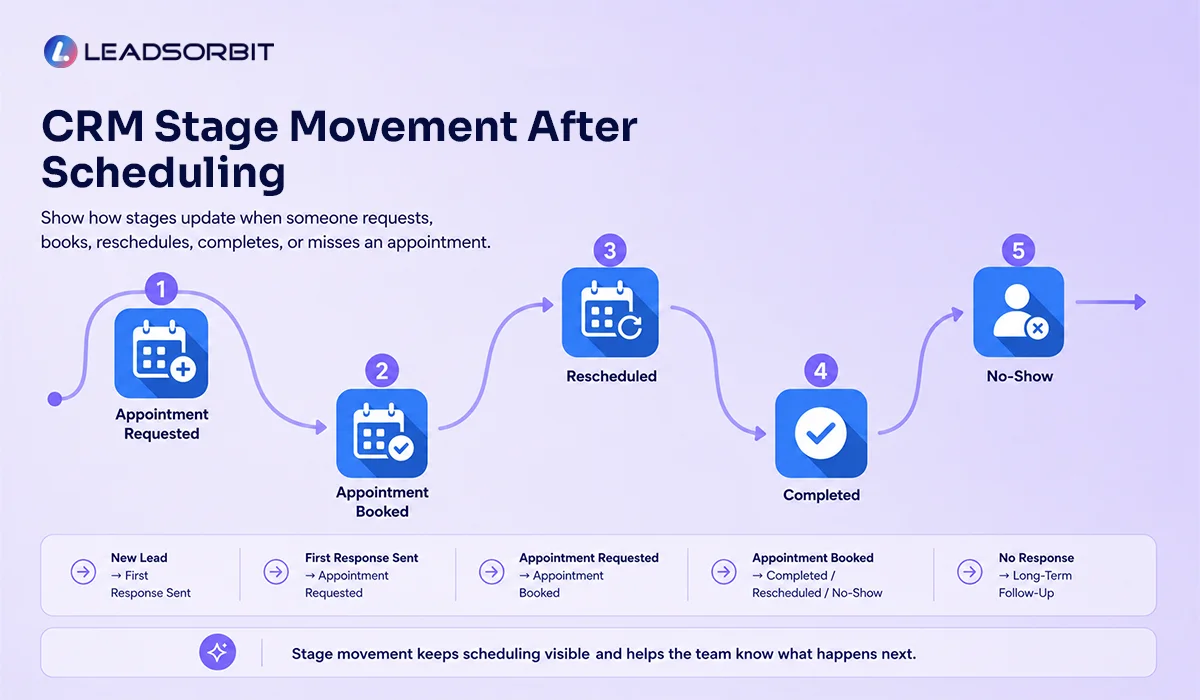
Scheduling automation should not stop at the calendar. The CRM stage should also change based on what happened. This keeps the team from treating a booked appointment like an uncontacted lead.
For example, once a lead books, the system should stop active sales follow up and start appointment reminders. If the lead asks a question but does not book, the system may move them to an engaged or appointment requested stage.
- New Lead to First Response Sent when the first message goes out.
- First Response Sent to Appointment Requested when the lead asks about scheduling.
- Appointment Requested to Appointment Booked when the appointment is confirmed.
- Appointment Booked to Completed, Rescheduled, or No Show after the appointment outcome.
- No Response or Long Term Follow Up when the lead does not book after the active sequence.
Stage movement makes scheduling visible. It also helps managers review where appointments are getting stuck.
Confirmation and Reminder Automation
After scheduling, the customer should receive confirmation and reminders without the team manually sending each message. These messages should be clear, short, and connected to the appointment status.
- Send confirmation immediately after booking.
- Send a 24 hour reminder with confirm or reschedule options.
- Send a same day reminder with the appointment time.
- Stop reminders if the appointment is canceled or rescheduled.
- Trigger no show follow up if the appointment is missed.
If your business handles healthcare related appointments, reminder content should stay appropriate and aligned with privacy rules. HHS guidance notes that appointment reminders can be part of treatment, but businesses should still use practical care with sensitive information.
HHS appointment reminders guidance can be a helpful reference for healthcare related appointment communication policies.
When Automation Should Hand Off to the Team
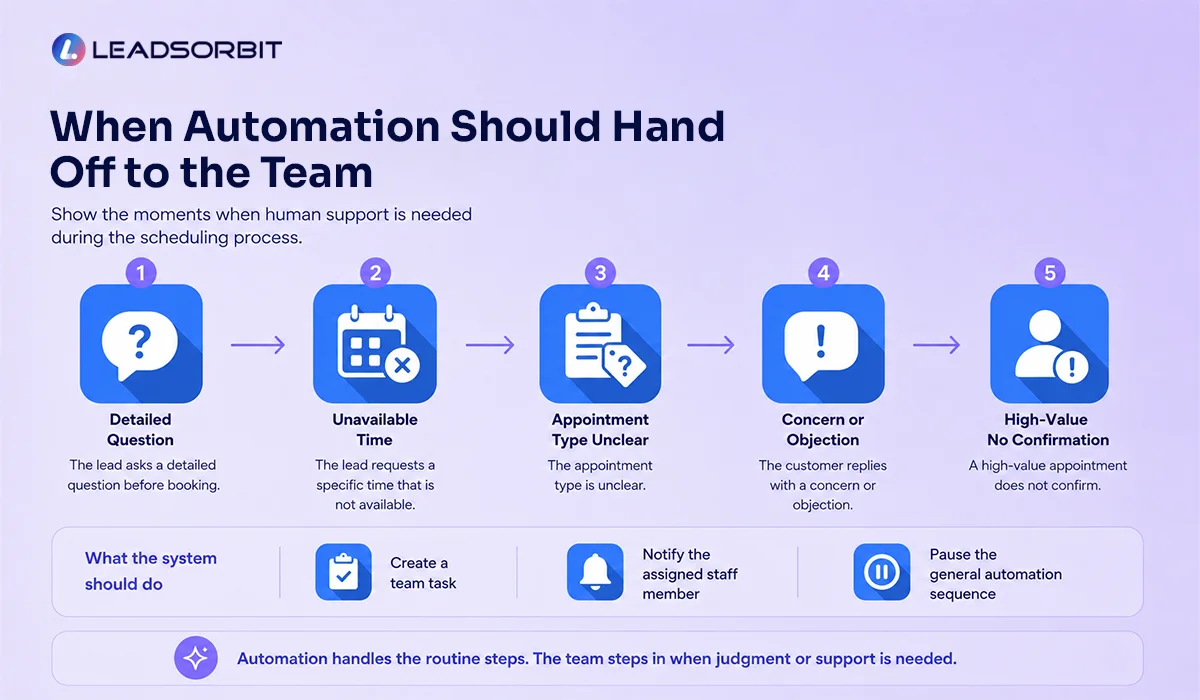
Automation should support human work, not hide important conversations. Some scheduling moments need a team member to step in, especially when the customer has a question, asks for a special time, or needs help choosing the right appointment type.
- The lead asks a detailed question before booking.
- The lead requests a specific time that is not available.
- The appointment type is unclear.
- The customer replies with a concern or objection.
- A high value appointment does not confirm.
A good automation system should create a task, notify the team, or pause the general sequence when human attention is needed.
Chiropractic and Dental Examples
A chiropractic office may receive a new patient inquiry from a landing page. Automation sends a booking link, updates the CRM when the appointment is booked, sends confirmation, and starts reminder messages. If the patient does not confirm, the team gets a task.
A dental practice may receive a consultation request through chat after hours. The system can share booking options, capture the appointment request, notify the team, and begin reminders once the appointment is confirmed.
LEADSORBIT supports these workflows for Chiropractic Software and Dental Software businesses where appointments, conversations, and follow up must work together.
How LEADSORBIT Supports Automated Appointment Scheduling
LEADSORBIT helps small businesses automate appointment scheduling steps inside an AI powered CRM environment. The goal is to connect booking activity with conversations, workflows, and pipeline visibility.
- AI Appointment supports appointment related booking and scheduling workflows.
- Workflow AI automates confirmations, reminders, task creation, and stage movement.
- Conversation AI keeps scheduling conversations organized across channels.
- CRM visibility helps the team see booked, unconfirmed, rescheduled, and missed appointments.
Try LEADSORBIT free for 14 days
FAQs About Automated Appointment Scheduling
It is the use of software and CRM workflows to help share booking options, create appointments, send confirmations, trigger reminders, update stages, and notify the team.
Final Thoughts
Automated appointment scheduling helps small businesses create a smoother path from inquiry to booked appointment. It removes avoidable delays, connects booking activity to the CRM, and supports the team with confirmations, reminders, and visibility.
The best system is not only a calendar. It is a workflow that understands what should happen before, during, and after the appointment is booked.
To see how LEADSORBIT can support automated appointment scheduling for your business, you can Book a Demo.

Start Your Free 14 Day Trial
Try LEADSORBIT and see how it captures missed calls, follows up instantly, and turns leads into booked appointments for your business.
Personal Message from Faisal Zulfiqar
Automation is most valuable when it makes the customer experience smoother and the team process clearer. Appointment scheduling is a perfect example because small delays can turn into missed opportunities.
My suggestion is to automate the repeatable steps first: booking links, confirmations, reminders, and stage updates. Then let your team step in where a real conversation is needed.