
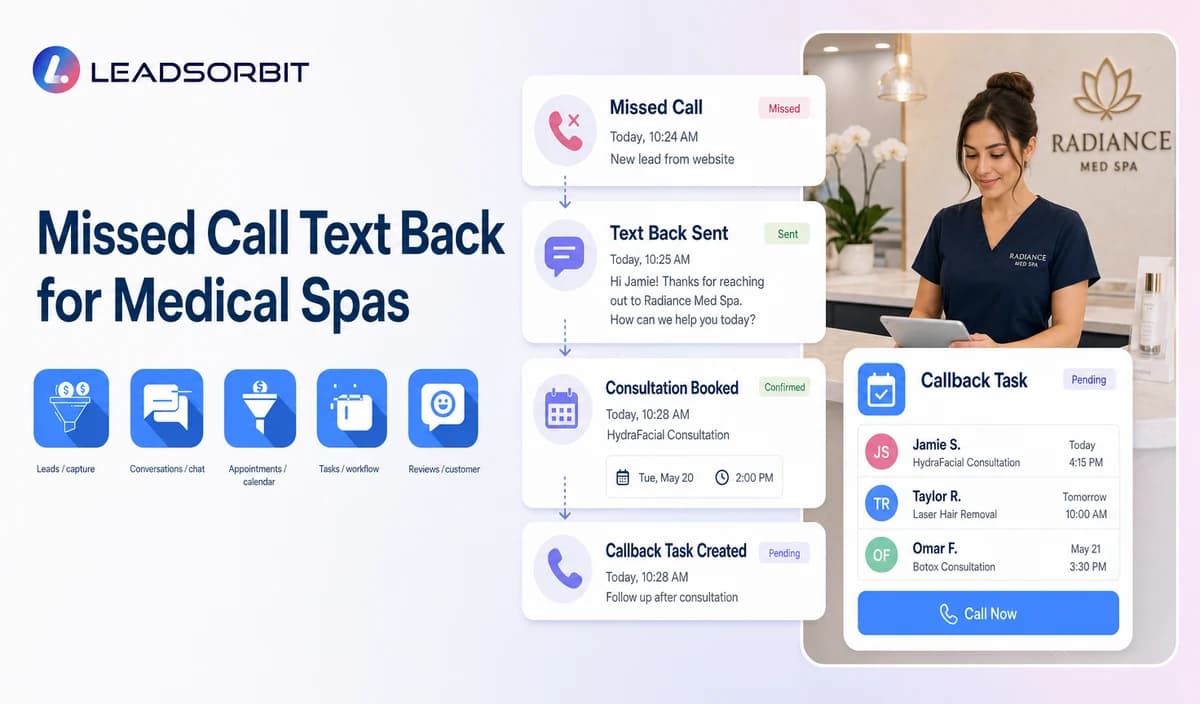

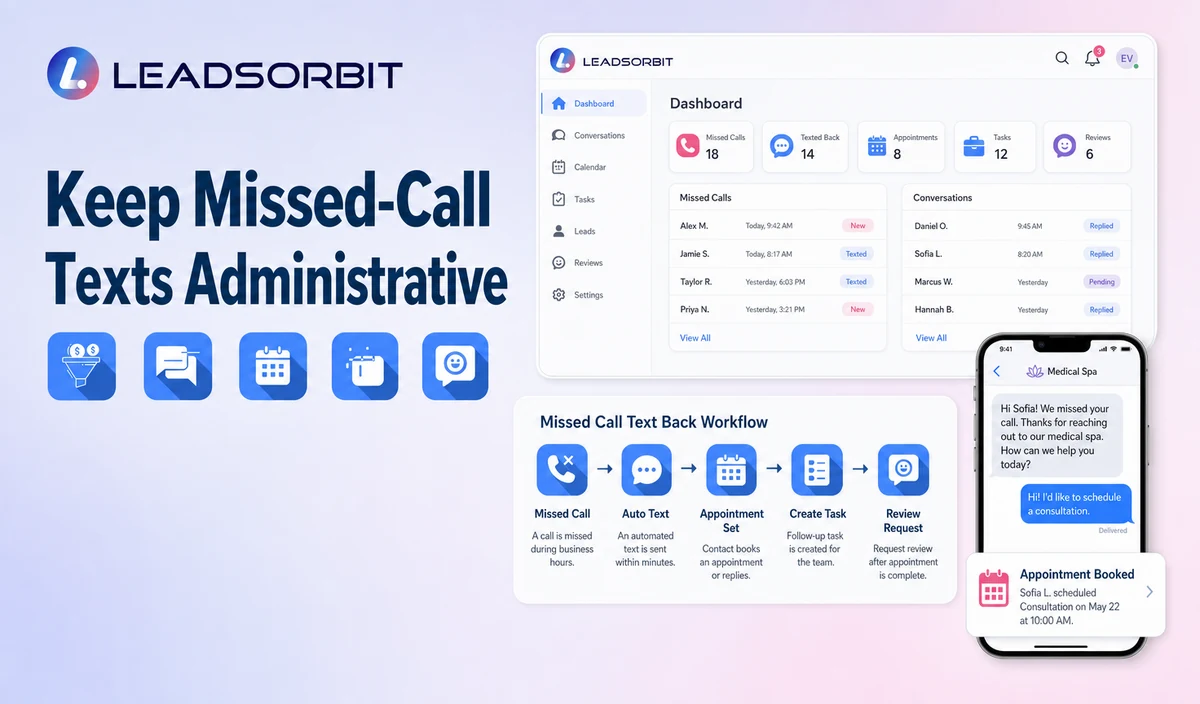
A medical spa can miss a call while staff are checking in a patient, assisting a provider, answering treatment related questions, or managing several conversations at once. Missed call text back gives the caller an immediate administrative response path while creating a visible next action for the front desk.
This guide focuses on medical spa missed call recovery. For the broad problem, read how missed calls cost small businesses revenue. The commercial medical spa destination remains LEADSORBIT Medical Spa Software.

Who This Guide Is For
- Medical spas that miss calls during busy patient facing periods.
- Practices receiving consultation inquiries after hours.
- Teams that rely on voicemail but lack clear callback ownership.
- Multi location practices that need the correct office, booking link, and staff owner.
- Healthcare organizations reviewing consent, opt out, HIPAA, and data minimization controls.
Why Medical Spas Miss Calls
A missed call is often an operational gap rather than poor service. The team may already be handling work that cannot be interrupted.
- A new consultation inquiry arrives while the front desk is checking in a patient.
- An existing patient calls during a provider or scheduling conversation.
- The practice receives a call outside business hours.
- A transfer reaches an unavailable coordinator.
- The caller hangs up before leaving voicemail.
- A voicemail exists but no named person owns the callback.
- Multiple locations or phone numbers create uncertain routing.
A Practical Missed Call Text Back Workflow
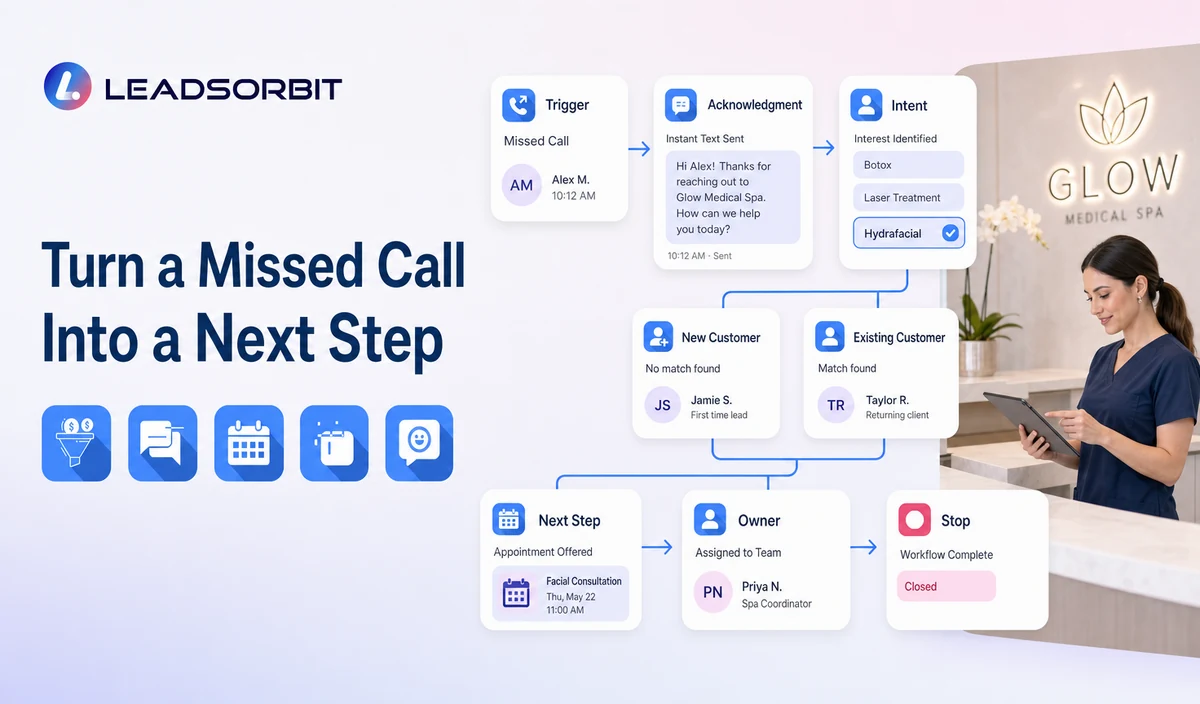
| Stage | Workflow action | Staff responsibility | Stop or escalation rule |
|---|---|---|---|
| 1. Validate the trigger | An unanswered inbound call meets the configured missed call rules. | Confirm qualifying outcomes, excluded numbers, duplicate behavior, and office hours. | Do not trigger for internal calls, spam, blocked numbers, or excluded call types. |
| 2. Send acknowledgment | Identify the medical spa and invite a simple reply. | Approve daytime and after hours wording. | Honor opt outs and delivery failure rules. |
| 3. Capture general intent | Ask whether the caller needs a consultation, appointment help, general office information, or staff callback. | Review sensitive, unclear, or clinical replies. | Stop routine automation when human handling is required. |
| 4. Branch new or existing | Use the correct consultation or existing patient path. | Maintain separate ownership and scripts. | Do not ask existing patients to repeat new inquiry questions. |
| 5. Offer next step | Provide approved booking, appointment change, or callback options. | Resolve provider, location, calendar, records, billing, clinical, or policy exceptions. | Stop after valid booking, staff takeover, resolution, or opt out. |
| 6. Create CRM visibility | Record the missed call, reply, owner, task, and status. | Review overdue and duplicate tasks. | Escalate unresolved records to the backup owner. |
| 7. Review performance | Check delivery, replies, consultation bookings, callbacks, opt outs, complaints, and errors. | Improve rules using real conversations. | Pause a branch that creates confusion or privacy risk. |
Daytime and After Hours Messages Need Different Wording
| Situation | Useful response | Team action | Avoid |
|---|---|---|---|
| Daytime missed call | Acknowledge the call and ask how the practice can help. | Create a same business period booking or callback task. | Promising an exact callback time the team cannot meet. |
| After hours missed call | State that the practice is closed and offer a consultation request or next business period callback. | Place the request in the correct queue. | Making the caller believe live staff are present. |
| Failed transfer | Explain that the call could not connect and confirm the next action. | Create a priority callback for the intended owner. | Restarting a long intake sequence. |
| Repeated call | Recognize that an open request may already exist. | Update or merge the existing task where supported. | Sending the same text after every call attempt. |
| Clinical or urgent language reply | Stop routine questions and use the predefined message or transfer path. | Notify the designated qualified owner. | Allowing the system to decide urgency or recommend treatment. |
Medical Spa Missed Call Text Templates
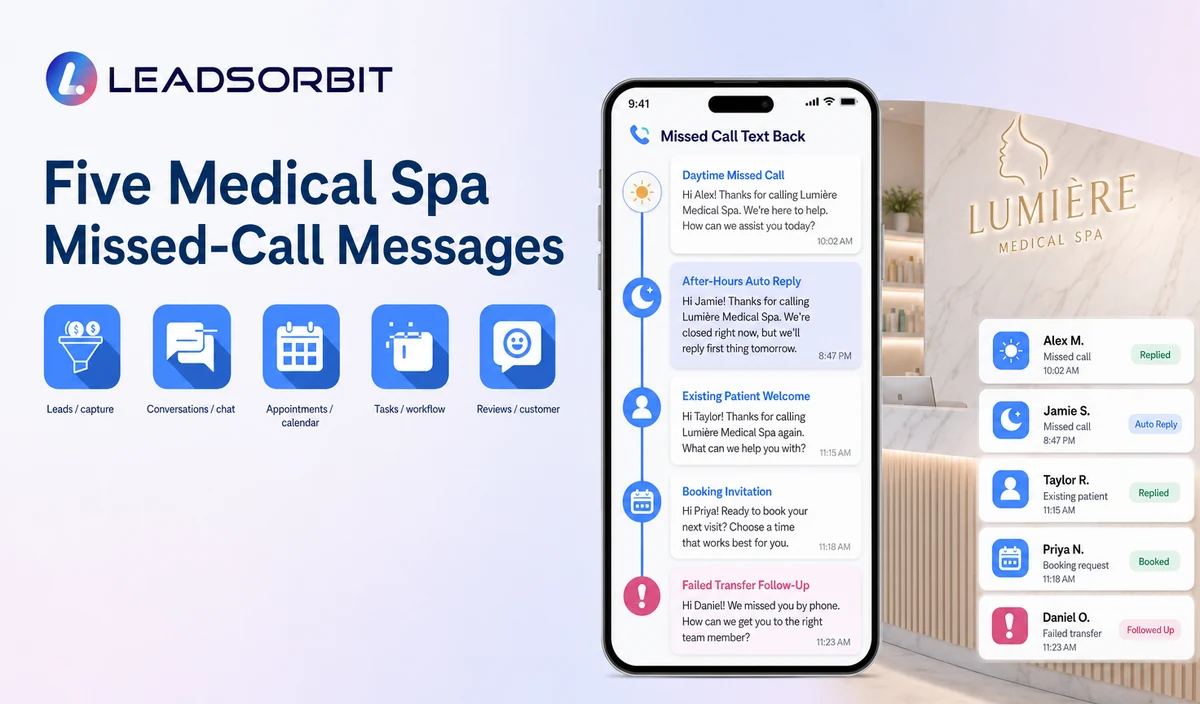
Template 1: Daytime Missed Call
Template 2: After Hours Inquiry
Template 3: Existing Patient Appointment Help
Template 4: Consultation Booking Path
Template 5: Failed Transfer
New Consultation and Existing Patient Reply Branches
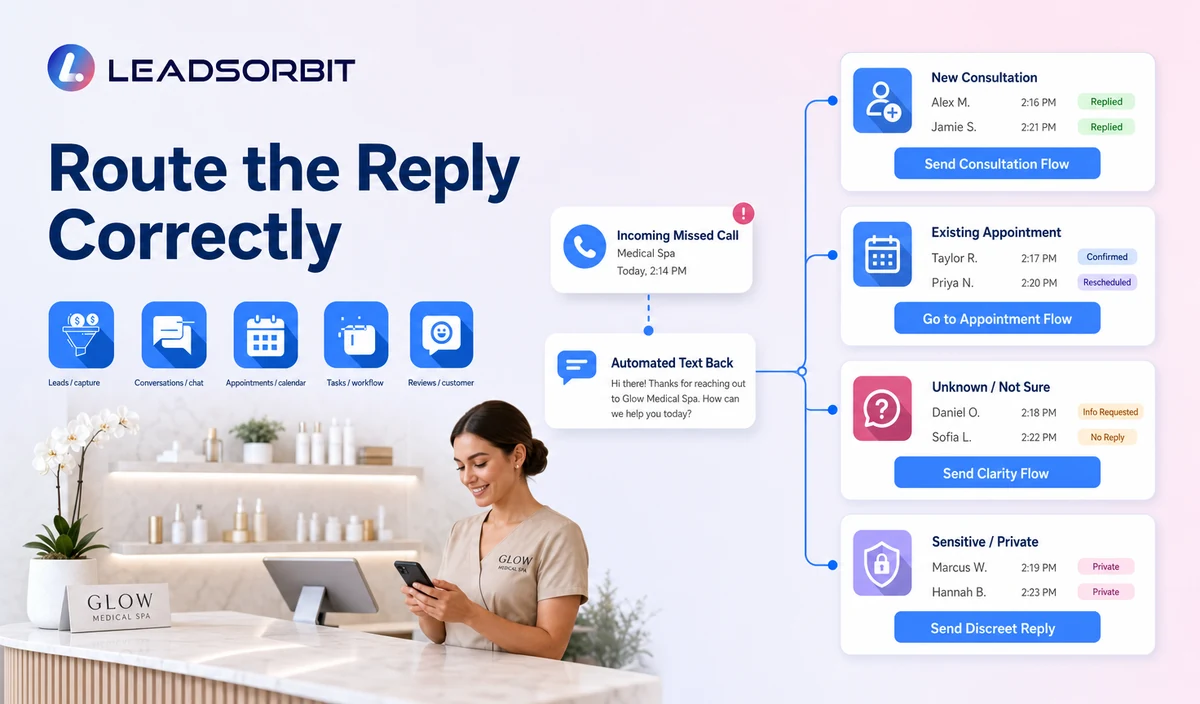
| Caller status | Useful routing information | Next step | Avoid |
|---|---|---|---|
| New consultation inquiry | Name, callback, high level service category, location/provider preference where relevant, preferred time. | Approved consultation booking or staff callback. | Symptoms, contraindication screening, diagnosis, treatment selection, or suitability assessment. |
| Existing patient | Name, callback, appointment change reason or general administrative category. | Appointment support or correct staff task. | Repeating new inquiry intake or discussing records, photos, prescriptions, treatment, or billing in routine SMS. |
| Unknown status | Ask one clarifying question. | Use the correct branch after the reply. | Guessing or merging unrelated records. |
| Clinical or sensitive reply | Collect minimum callback information only when appropriate. | Human handoff under practice policy. | Analyzing, summarizing, or responding with medical advice. |
Consent, Opt Outs, and Healthcare Data
The FCC’s TCPA guidance explains that consumers can revoke consent through reasonable methods, including standard text replies such as STOP, for applicable automated communications. Medical spas should confirm their exact message type, consent source, technology, and jurisdiction with qualified advisers.
LEADSORBIT supports HIPAA compliant administrative workflows for eligible healthcare organizations through HIPAA enabled HighLevel subaccounts. Compliant use depends on maintaining the active HIPAA package, applicable agreements, approved account configuration, user permissions, integrations, retention settings, and the healthcare organization’s own procedures.
Names, phone numbers, missed call events, consultation requests, appointment status, replies, and conversation history may be PHI depending on context. Use minimum contact and operational information and review the specific subaccount, SMS number, permissions, retention, calendar, AI settings, and integrations.
When to Stop the Workflow
- The caller books a valid consultation or appointment.
- The caller sends a meaningful reply that needs a person.
- A staff member takes ownership.
- The caller opts out or revokes consent.
- The number is invalid, blocked, spam, or reassigned.
- A complaint, privacy concern, clinical question, or urgent language request appears.
- The configured attempt limit is reached.
- The call belongs to an excluded or internal workflow.
Common Medical Spa Missed Call Mistakes
- Sending a message that does not identify the practice.
- Treating every missed call as a new consultation lead.
- Using the same wording during business hours and after hours.
- Asking several questions before the caller understands why they are receiving a text.
- Continuing messages after reply, booking, opt out, or staff takeover.
- Failing to assign a human owner for unresolved requests.
- Sending duplicate texts from multiple workflows.
- Collecting clinical, records, photos, prescription, billing, or payment information in routine SMS.
- Promising immediate treatment, provider availability, or results.
- Assuming the missed call trigger works identically in every account.
Missed Call Setup Checklist
- Confirm which phone numbers and call outcomes qualify.
- Exclude internal, spam, blocked, test, and inappropriate calls.
- Approve separate daytime, after hours, failed transfer, and repeated call rules.
- Identify the practice and provide the approved opt out method.
- Define the permitted first question and response options.
- Create new inquiry, existing patient, consultation, callback, help, and escalation branches.
- Assign primary and backup owners.
- Confirm SMS sender, two way replies, delivery failures, CRM tasks, and retention.
- Review HIPAA enabled account status, agreements, permissions, and integrations.
- Test duplicate calls, opt outs, staff takeover, booking, sensitive replies, and incorrect routing.
See the Missed Call Workflow With Your Rules
Book a Demo to map your medical spa missed call trigger, text wording, consultation booking, callback owners, stop conditions, SMS setup, and healthcare data controls inside LEADSORBIT.
What to Measure
- Missed calls that entered the approved workflow.
- Calls excluded correctly.
- SMS delivery failures and duplicate messages.
- Replies by consultation, appointment change, general question, callback, help, and opt out.
- Valid consultation bookings connected with the original missed call.
- Unresolved staff tasks beyond the practice’s service window.
- Clinical, sensitive, complaint, records, billing, or urgent language replies handed to staff.
- Caller complaints, confusion, or privacy concerns.
- Staff feedback about ownership and workload.
How LEADSORBIT Supports Medical Spa Missed Call Recovery
LEADSORBIT’s AI powered CRM can connect missed call activity, configured SMS follow up, consultation paths, conversation history, tasks, and status visibility.
- AI Receptionist: supports inbound and after hours call handling with approved questions and next steps.
- Workflow AI: supports configurable triggers, SMS or email actions, tasks, conditions, timing, and stop logic.
- Conversation AI: supports reply visibility, routing, human takeover, and CRM synchronization.
- AI Appointment: supports booking, connected calendars, confirmations, rescheduling, and cancellation.
The exact missed call trigger, number setup, SMS permissions, timing, duplicate behavior, recording, transcription, fields, and integrations require configuration validation. LEADSORBIT is not positioned as an EMR, clinical intake, photo/consent, prescribing, billing, or treatment planning system.
Try LEADSORBIT free for 14 days
FAQs
It is a configured SMS workflow that responds after an unanswered call and routes the caller toward consultation booking, appointment help, a general answer, staff callback, or escalation.
Final Thoughts
Missed call text back for medical spas should identify the practice, open a simple reply path, create clear ownership, and stop at the right time. Clinical, urgent, or sensitive requests belong with qualified staff.
Book a Demo to see how LEADSORBIT can connect medical spa missed calls, approved texts, consultation booking, callback tasks, and CRM visibility.

Start Your Free 14 Day Trial
Try LEADSORBIT and see how it captures missed calls, follows up instantly, and turns leads into booked appointments for your business.