
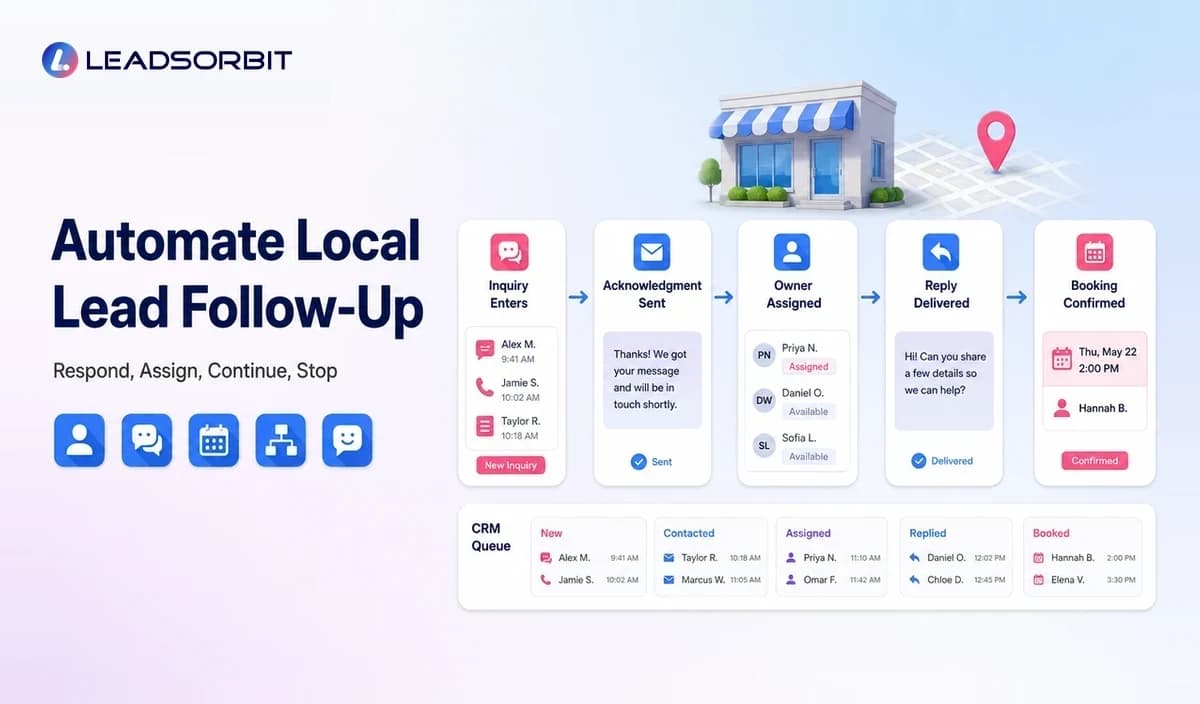

A local business can spend money generating leads and still lose the opportunity during follow up. The inquiry arrives, the team is serving a customer, and the response is delayed or forgotten.
Automated lead follow up gives the business a repeatable response process. It confirms the inquiry, creates ownership, continues appropriate communication, and stops when the lead replies, books, declines, or opts out.
This supporting guide focuses specifically on the follow up workflow. For the broader system, see the local business marketing automation guide and the main lead follow up automation pillar.
What Is Automated Lead Follow Up?
Automated lead follow up is a workflow that begins when a prospect takes an action and then manages approved communication and internal tasks according to timing, status, and response.
The trigger may be a form submission, missed call, chat, estimate request, appointment inquiry, abandoned booking, or message from a local profile. The workflow should preserve the original context so the team understands why the prospect contacted the business.
Why Manual Follow Up Breaks Down
The Team Is Busy Delivering the Service
Local service teams cannot always stop work to answer every inquiry immediately. Without a visible queue and clear ownership, the lead may remain in an inbox until much later.
No One Knows Who Owns the Lead
Shared inboxes and group notifications can create the assumption that someone else will respond. A CRM task or assigned conversation makes responsibility explicit.
The Next Follow Up Date Is Not Recorded
A prospect may ask to be contacted later, request an estimate, or need time to decide. If the date and reason are not stored, the opportunity depends on memory.
Messages Are Repeated or Contradictory
When multiple employees use different tools, a lead may receive duplicate messages or an automated reminder after already booking. Connected status and stop rules reduce this risk.
The Local Lead Follow Up Workflow
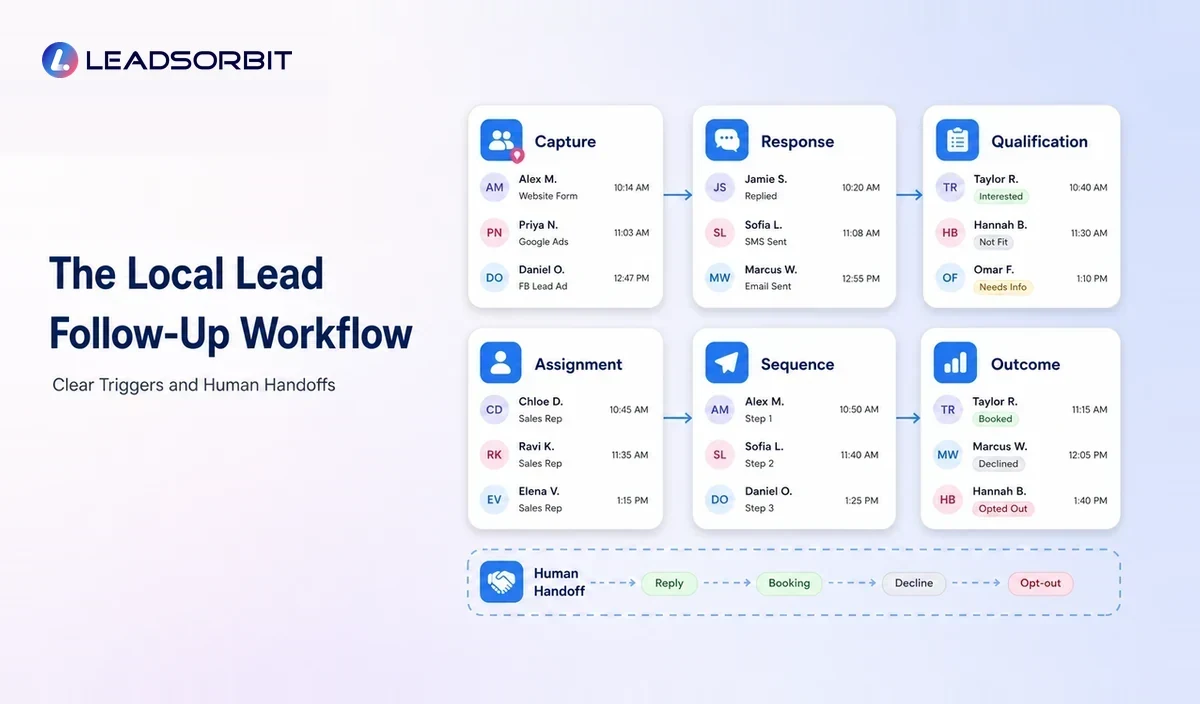
| Stage | Automation Role | Human Role |
|---|---|---|
| Capture | Create or update the record and preserve source context. | Review the inquiry and correct missing information. |
| Acknowledge | Confirm receipt and explain the next step. | Step in immediately for urgent or complex requests. |
| Qualify | Ask approved basic questions or apply service and location rules. | Handle judgment, pricing, and unusual needs. |
| Assign | Route the lead and create a task. | Take ownership and update status. |
| Continue | Send a limited sequence across approved channels. | Answer replies and personalize the conversation. |
| Convert or close | Stop on booking, acceptance, decline, or opt out. | Confirm the outcome and record useful notes. |
The workflow should be easy for the team to understand. Every stage needs a trigger, owner, timing rule, message purpose, and stop condition.
How to Automate the First Response
The first automated message should acknowledge the inquiry rather than pretend that a full conversation has already happened. It can confirm receipt, state when the team will respond, and provide a useful next step such as a booking link or request for basic details.
- Identify the business clearly.
- Reference the service or inquiry when possible.
- Set an accurate expectation for human follow up.
- Avoid promising availability, pricing, or outcomes the system cannot confirm.
- Give the prospect a simple way to reply or book.
- Do not send the same message through several channels at once.
An AI receptionist can support calls and after hours inquiries, but the script, qualification questions, routing, and escalation rules still need business review.
How to Build a Follow Up Sequence
Use a Small Number of Purposeful Touches
Each message should add value or clarify the next step. A sequence might acknowledge the inquiry, provide the requested information, remind the lead about the booking option, and end with a respectful final check in.
Match the Channel to the Situation
SMS can be useful for concise, timely communication. Email can support longer explanations, documents, and service details. Calls may be appropriate for complex or high intent requests.
The business should respect channel preferences, consent, frequency, and applicable rules rather than assuming every contact permits every type of message.
Use Conditional Logic
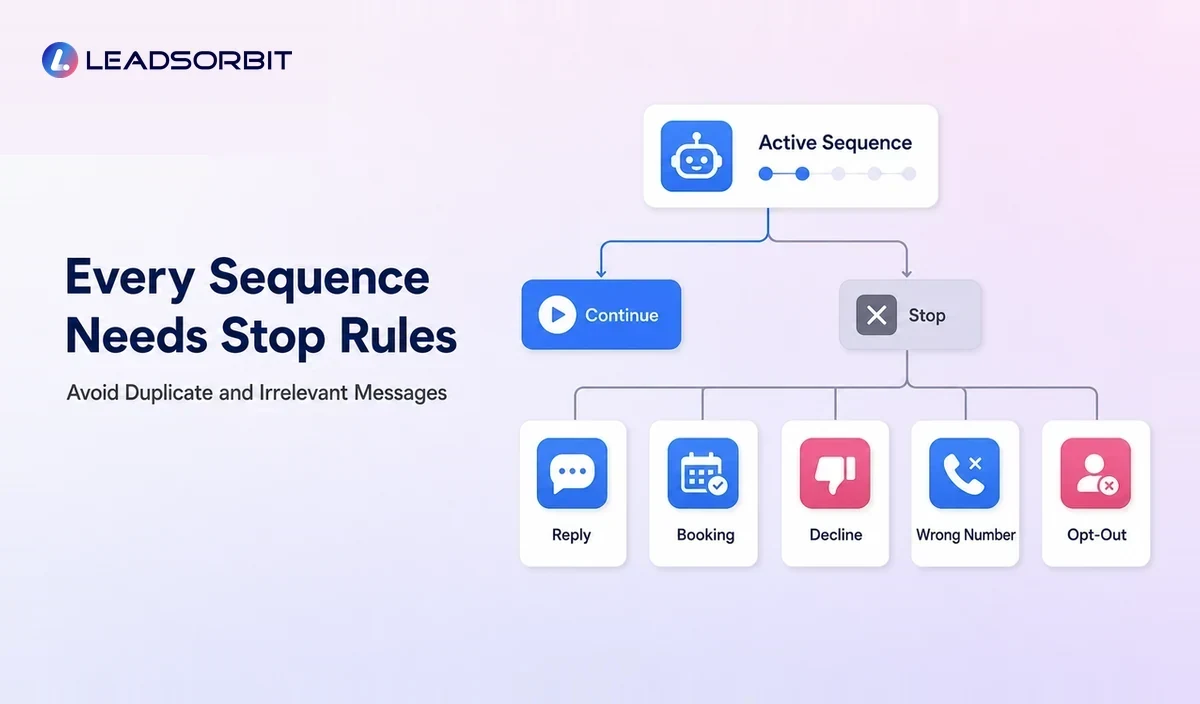
A lead who replies should leave the generic sequence and enter a managed conversation. A lead who books should move to appointment confirmation. A lead outside the service area may receive a clear response and close.
Create Human Escalation
Keywords, negative replies, repeated questions, pricing requests, and high value opportunities can create a task or alert. Automation should make human attention easier to direct.
Examples for Local Businesses
Home Service Estimate Request
The lead submits a form with service type and postcode. The system confirms receipt, checks the service area, assigns the request, and follows up if the estimate conversation is not started.
Clinic Appointment Inquiry
The prospect calls after hours. The system records contact details, provides an approved response, offers a booking path, and creates a front desk task. Sensitive or clinical questions are routed to staff.
Pet Grooming Availability Request
The customer asks about a service and preferred date. The system sends current booking instructions, stores the conversation, and stops the inquiry sequence once an appointment is created.
Auto Detailing Quote
A quote request is tagged by vehicle and package. The team receives the information in one record, and the workflow schedules a follow up if the prospect does not respond to the quote.
After Hours and Missed Call Follow Up
After hours automation should be transparent about business availability. It can acknowledge the inquiry and collect useful information without suggesting that a person is actively available when they are not.
A missed call text back workflow should also account for wrong numbers, existing customers, emergency language, opt outs, and calls from people who do not expect a marketing message.
Compliance and Consent Considerations
Automated email and text communication can be subject to different requirements based on content, channel, consent, location, and technology. Businesses should review the FTC's commercial email guidance and relevant FCC information on calls and texts before launch.
Keep records of consent where needed, identify the business, provide appropriate opt out mechanisms, honor requests promptly, and obtain professional advice for the specific program. This is operational guidance, not legal advice.
Lead Follow Up Automation Checklist
- All lead sources create or update one record.
- The first response sets an accurate expectation.
- Every lead has a visible owner.
- The sequence uses a limited number of relevant touches.
- Replies, bookings, declines, and opt outs stop generic messages.
- Complex questions create a human task.
- Existing customers are separated from new prospects.
- Staff can pause or override the workflow.
- Failed messages and duplicate contacts are reviewed.
- The team measures progress, not only message volume.
Common Mistakes
- Responding quickly with a message that does not answer the inquiry
- Using identical sequences for every service and lead source
- Continuing after the lead has booked or replied
- Failing to monitor the inbox connected to the automation
- Sending too many messages over a short period
- Automating estimates or promises that require human review
- Leaving overdue tasks invisible to the owner
How LEADSORBIT Supports Automated Lead Follow Up
LEADSORBIT connects new inquiries with CRM records, conversations, pipeline stages, tasks, appointments, and workflows. Workflow AI can coordinate the sequence, while Conversation AI helps the team manage customer replies in context.
When booking is the next action, AI Appointment can connect the follow up with an approved scheduling path. The team remains available for personal conversations and exceptions.
How to Measure Lead Follow Up Quality
The business should measure whether the lead receives useful attention and moves to a clear outcome. Message counts alone do not show follow up quality.
- Uncontacted leads by source and service
- First meaningful response status
- Overdue tasks and unassigned conversations
- Replies waiting for a human response
- Bookings, estimates, declines, and disqualified leads
- Sequences stopped by reply, booking, or opt out
- Duplicate, failed, or misrouted messages
- Common questions that require better website or workflow information
Review a small sample of real conversations as well as the dashboard. A numerical report may not reveal whether the messages were accurate, helpful, and appropriate.
Try LEADSORBIT free for 14 days
Frequently Asked Questions
The acknowledgment can be immediate when the trigger and message are appropriate, but it should set a truthful expectation for human response. The business should not imply that a person has reviewed the inquiry when that has not happened.
Final Thoughts
Automated lead follow up helps a local business acknowledge inquiries, assign responsibility, continue appropriate communication, and move the prospect toward a clear next step.
Make Every New Inquiry Visible

Start Your Free 14 Day Trial
Try LEADSORBIT and see how it captures missed calls, follows up instantly, and turns leads into booked appointments for your business.