
If you are comparing tools right now, one of the first questions is usually simple: what is the cost of an ai receptionist for small business? The problem is that the answer is rarely just one number. Some providers charge a monthly platform fee. Some charge per user. Some charge per call, per minute, per message, or by usage on top of the base plan. Official pricing pages across the market show exactly that mix: OpenPhone publishes per user monthly plans, Smith.ai publishes receptionist plan pricing, and Twilio publishes usage based voice and SMS rates.
That is why this guide matters. I am not going to give you one fake universal price. Instead, I will show you how AI receptionist pricing is usually structured, what is often included, which extra fees create surprises, and how to compare options in a practical way. You will also get a simple cost check checklist, a pricing comparison framework, and the key metrics to watch so you can judge cost against actual business value, not just the sticker price.
Why AI Receptionist Pricing Feels Confusing At First
A lot of owners start by asking for a monthly number.
That makes sense, but it is not enough.
The real reason pricing feels confusing is that different providers use different models. For example:
- OpenPhone lists user based monthly plans on its pricing page.
- Smith.ai highlights receptionist plan pricing with different service levels and coverage.
- Twilio publishes usage based pricing for voice and SMS, which shows how communication costs can be billed separately from software access.
So when owners compare one "AI receptionist" tool to another, they are often not comparing the same billing structure at all.
That is where most confusion starts.
If you already read the parent pillar, AI Receptionist for Small Business, think of this article as the pricing lens for that broader workflow.
What Usually Makes Up The Cost Of An AI Receptionist
Most AI receptionist pricing falls into a few common buckets.
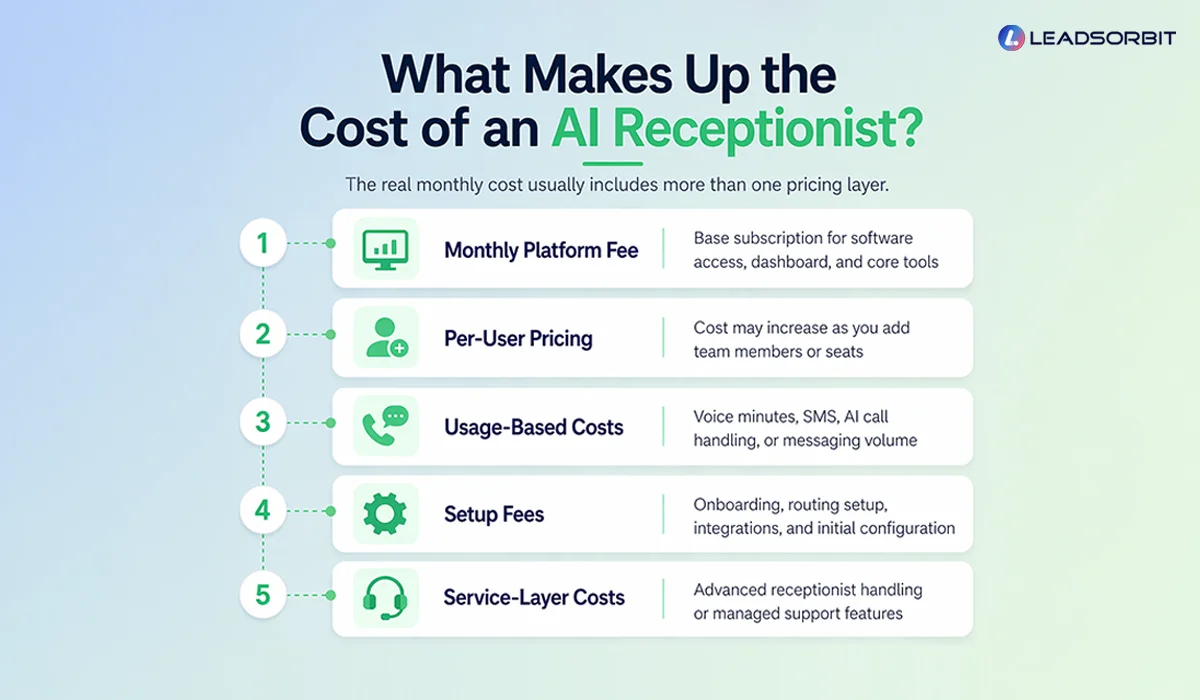
Monthly Platform Fee
This is the base subscription.
It may include:
- Access to the platform
- A certain number of users
- A basic phone setup
- Limited workflows or features
- Dashboard or inbox access
On some platforms, that base fee is the main cost. On others, it is just the entry point.
Per User Pricing
Some business phone platforms use a per user model.
That means cost rises as you add:
- Front desk users
- Managers
- Sales staff
- Additional locations or team seats
OpenPhone’s pricing page is a good example of a plan structure built around monthly pricing tiers and user based access.
If your team is growing, this model can feel clean and predictable. But it may become more expensive as more people need access.
Usage Based Costs
This is where many owners get surprised.
Usage based pricing may include:
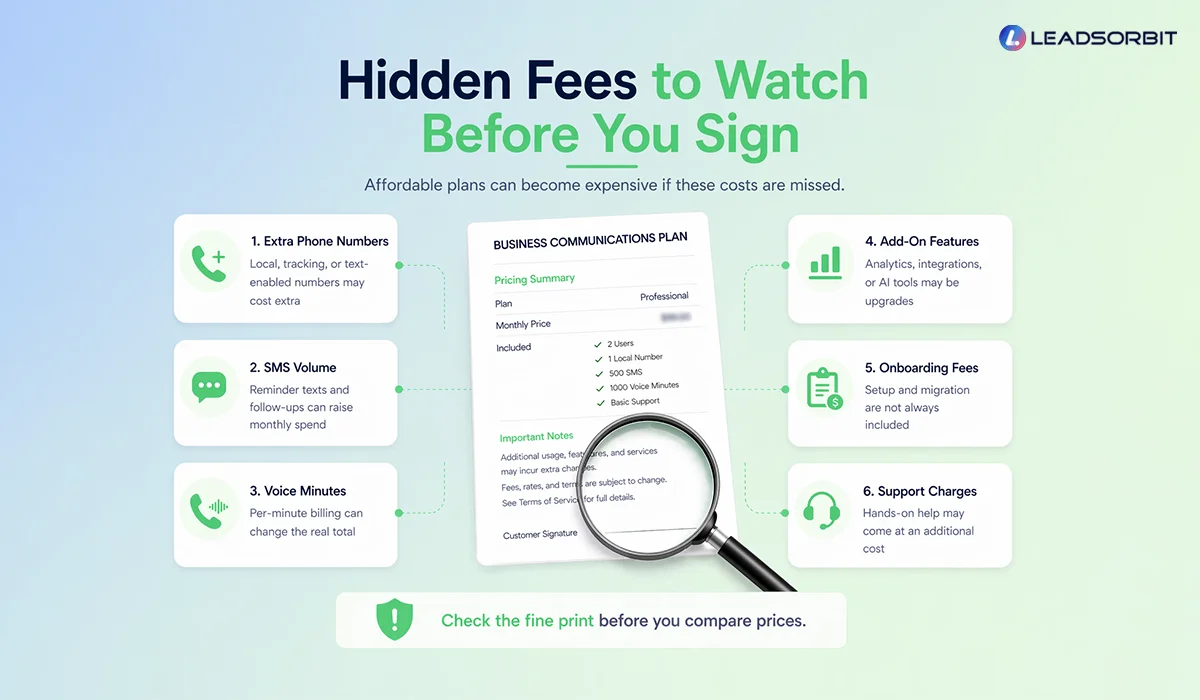
- Voice minutes
- SMS messages
- AI call handling time
- Extra phone numbers
- Messaging volume
Twilio’s official pricing pages show clearly that voice and SMS can be billed on a usage basis rather than only as a flat subscription.
This does not automatically make usage based pricing bad. It just means you need to understand your call and message volume before assuming the plan is affordable.
Setup Fees
Some providers charge setup separately.
That may cover:
- Onboarding
- Workflow setup
- Number configuration
- Routing rules
- Integration work
- Initial scripting or intake design
This is one of the easiest costs to miss when you only compare monthly pricing.
Service Layer Costs
If the solution includes more advanced support, like receptionist handling or more managed service features, the price may reflect that.
Smith.ai’s pricing reflects that this category can be structured differently from a simple phone seat tool.
That is important because some businesses are not only paying for software. They are paying for more direct handling or service support around the communication workflow.
What Is Often Included In AI Receptionist Pricing
Not every provider bundles the same things, but these are the most common inclusions to check for.
Basic Call Answering Or Routing
You want to know whether the plan includes:
- Inbound call handling
- Call menus
- Routing rules
- Voicemail handling
- Business hours logic
Missed Call Text Back
This is one of the most practical features in this whole category.
Check whether it is:
- Included
- Limited
- Usage based
- Only available on higher plans
Texting Capability
Do not assume texting is included in the way you expect.
Ask:
- Can the same business number text
- Are messages charged separately
- Is two way texting fully supported
- Are there delivery or compliance limits
Twilio’s SMS pricing is a good reminder that messaging can carry its own cost structure.
Reporting And Call Analytics
You should know if the plan includes:
- Missed call reporting
- Response metrics
- Call logs
- Source or call tracking visibility
- Conversation history
Integrations
Some plans include integrations with:
- CRM
- Calendars
- Booking tools
- Automation workflows
Others limit them to higher tiers.
AI Handling Or Automation Features
This is where pricing differences often widen.
Ask:
- Is AI call handling included
- Is it capped
- Is it charged by usage
- Are automations limited by plan
A Simple Way To Compare AI Receptionist Pricing
The easiest mistake is comparing only the base price.
A better approach is to compare the real operating cost.
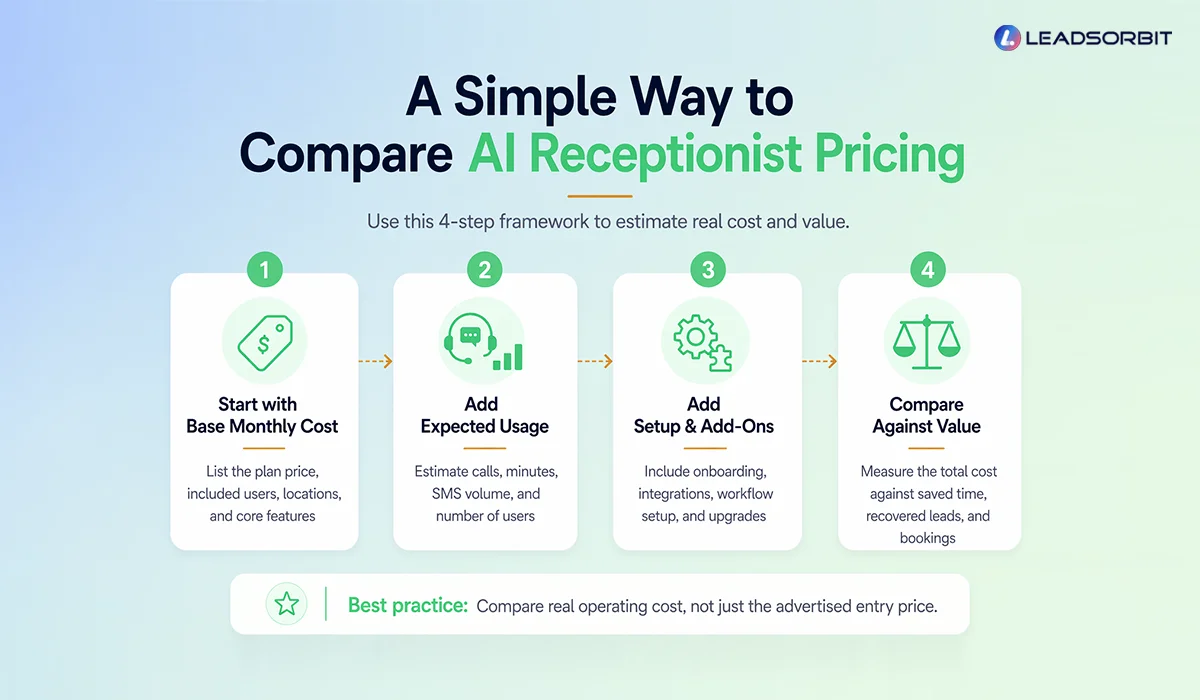
Step 1: Start With The Base Monthly Cost
Write down:
- Base plan price
- Users included
- Locations included
- Core features included
Step 2: Add Expected Usage
Estimate:
- Monthly call volume
- Missed call text volume
- Reminder text volume
- Number of users
- Number of numbers or locations
This gives you a more realistic estimate than the advertised entry price.
Step 3: Add Setup And Add Ons
Include:
- Onboarding fees
- Integration costs
- Workflow setup costs
- Premium feature upgrades
Step 4: Compare That Total Against Business Value
Ask:
- Will this help us answer more leads
- Will it reduce missed opportunities
- Will it improve booking flow
- Will it save staff time
- Will it help us respond after hours
That is how you move from “price” to “value.”
If you want the feature side of this comparison, pair this post with AI Receptionist Software Checklist.
AI Receptionist Pricing Checklist For Small Business
Use this before you choose any plan.
Cost Checklist
- What is the base monthly fee
- Is pricing per user, per call, per minute, or mixed
- Are voice minutes included or billed separately
- Are SMS messages included or billed separately
- Are extra phone numbers included
- Is setup included
- Are integrations included
- Are reporting features included
- Is missed call text back included
- Are AI features capped or usage based
- Are there onboarding or support fees
- What is the realistic monthly cost at our expected usage
This one checklist can prevent a lot of buying regret.
What Affordable Really Means In This Category
A lot of businesses look for an affordable AI receptionist service.
That is reasonable, but “affordable” should not mean “lowest monthly number.”
Affordable should mean:
- Clear pricing
- Low surprise costs
- Features you will actually use
- Savings in team time
- Better lead recovery
- Stronger booking flow
A cheaper plan that still lets leads fall through can cost more in missed revenue.
A slightly more expensive plan that improves follow up and booking may deliver better value.
That is why this should not be treated like buying a generic software seat. It is closer to choosing how your business handles live demand.
Mistakes To Avoid When Reviewing AI Receptionist Pricing
Looking Only At The Entry Plan
The entry plan is often not the real operating cost.
Ignoring Usage
If voice and SMS are billed separately, usage matters a lot.
Assuming All AI Features Are Included
They may be limited, capped, or sold as add ons.
Skipping The Setup Conversation
Setup costs and workflow design can change the true first month spend.
Comparing Different Pricing Models Like They Are The Same
Per user, per call, per minute, and hybrid pricing are not directly equal.
Forgetting To Connect Cost To Outcomes
A good pricing decision should be tied to:
- Saved time
- Recovered leads
- Faster response
- More bookings
Not just a lower monthly number.
What To Track After You Launch
The right way to judge AI Receptionist answering cost is to compare it against outcomes.
Track these metrics:
Missed Call Recovery Rate
Definition: The percentage of missed calls that become active conversations.
What improvement looks like: More missed callers turning into real follow up opportunities.
Call To Booking Rate
Definition: The percentage of inbound call leads that reach a booked next step.
What improvement looks like: Better conversion from the same demand.
Response Time
Definition: How quickly your business responds after a missed call or inquiry.
What improvement looks like: Faster acknowledgment and follow up.
After Hours Capture Rate
Definition: The share of after hours inquiries that still enter your workflow correctly.
What improvement looks like: Fewer overnight opportunities getting lost.
Cost Per Recovered Lead
Definition: Your operating cost relative to how many missed opportunities you actually recover.
What improvement looks like: Better efficiency over time, not just lower spend.
How LEADSORBIT Helps You Think About Price The Right Way
The biggest trap in this category is treating the purchase like a simple phone bill.
Usually, you are not only buying call handling. You are buying a lead response system.
That is why LEADSORBIT is better understood in terms of workflow value:
- AI Receptionist helps answer, route, and recover missed opportunities
- AI Employee helps extend responsiveness when your team cannot handle every inquiry manually
- For businesses like Medical Spa Software or HVAC Service Software, the value often shows up in better lead handling and fewer missed handoffs
- LEADSORBIT is meant to reduce leakage across calls, follow up, and booking, not just add another communication tool
If you are comparing prices right now, it often helps to see the workflow, not just the number. That is where a Book a Demo makes the conversation much easier.
FAQs
There is no single universal price. Costs usually depend on the provider’s model, such as monthly subscription, per user pricing, usage based billing, or a mix of these.
Final Thoughts
Here are the main takeaways:
- The cost of an AI receptionist is rarely just one flat number.
- Pricing may include monthly fees, per user fees, usage costs, and setup costs.
- SMS and voice charges can materially change the real monthly total.
- Hidden fees often come from add ons, extra numbers, and onboarding.
- The best comparison is real operating cost, not entry price.
- Affordable should mean practical value, not only the lowest monthly plan.
- Cost should always be judged against recovered leads, faster response, and better booking flow.
Personal Message from Faisal Zulfiqar
Pricing conversations can get frustrating very quickly.
One platform looks cheaper at first. Another looks more complete.
Then the fine print starts showing up.
That is why I always recommend looking beyond the headline price.
What really matters is whether the system helps your business respond better and recover more of the opportunities already coming in.
LEADSORBIT is built with that practical view in mind.
Not just a tool to answer calls, but a workflow that helps small businesses reduce leakage and stay more consistent.
If the investment helps you save time, handle leads better, and book more reliably, that is where the real value starts.
And that is the lens I would use every time.