
If you have been hearing the term everywhere, it is fair to ask: what is an AI receptionist for small business? In simple terms, it is a phone and conversation system that helps answer inbound calls, handle basic questions, collect caller details, route people to the right place, and support next steps like booking or follow up when your team cannot do it live every time. RingCentral describes its AI Receptionist as a tool that can answer calls around the clock, route and resolve calls, and support tasks that usually require live staff, voicemail, and multiple point tools. Google Cloud explains that virtual agents for calls can interact with callers using prompts and responses, support more complex conversations with generative AI, and escalate to humans when needed.
That means this is not just a smarter voicemail. It is a more structured front end response system. In this guide, I’ll break down what an AI receptionist does, how it works, what it should ask, where it helps most, what to expect before launch, and how it fits into a real small business workflow.
What an AI Receptionist Actually Does for a Small Business
The easiest way to understand it is to think about the front desk jobs that happen over the phone every day.
An AI receptionist can help with things like:
- Answering incoming calls
- Greeting callers in a natural way
- Asking basic intake questions
- Recognizing what the caller needs
- Routing calls to the right team member or department
- Handling after hours response
- Sharing simple business information
- Supporting appointment booking or next step routing
- Reducing missed call dead ends
RingCentral says its AI Receptionist can answer multiple calls at the same time, stay available 24/7, and be used as a primary front desk, backup for overflow, or for specific call flows depending on the business.
That is important because many small businesses do not need a giant call center setup. They need better call handling during busy periods, after hours, and when the team is stretched.
What an AI Receptionist Is Not
An AI receptionist is not:
- A magic fix for every business problem
- A replacement for every human interaction
- Only a chatbot with a phone number
- Useful only for big enterprise companies
A better way to think about it is this:
It supports the repetitive, time sensitive, first line parts of call handling so your team can focus on the conversations that actually need a person.
Google Cloud’s documentation on virtual agents makes this distinction clear by showing that voice virtual agents can handle self service conversations and also escalate to human agents when necessary. Twilio’s virtual agent documentation also centers on connecting phone calls to conversational AI experiences rather than pretending every call should stay fully automated from start to finish.
That is why the best setups are not “AI only.” They are structured handoff systems.
How AI Phone Answering Usually Works Behind the Scenes
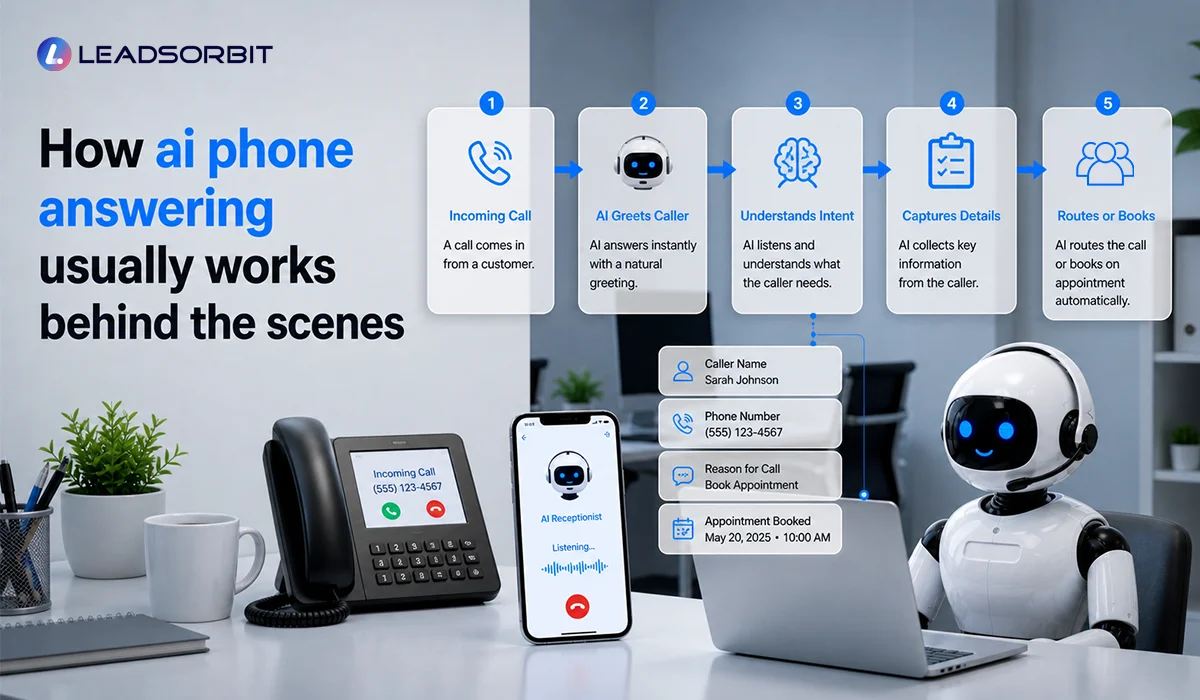
From the outside, it can feel simple:
The caller speaks, the system responds.
But there is usually a practical workflow behind that experience.
1. The Call Comes In
The business receives an inbound call during business hours, after hours, or during overflow periods.
2. The Caller Is Greeted
The AI receptionist gives a greeting based on the business setup.
That greeting can be shaped by:
- Business name
- Business hours
- Department or location
- Type of caller need
- Time of day
RingCentral says businesses can define custom rules for when AI Receptionist is used, including by time, number, department, or location.
3. The System Identifies Intent
The caller explains what they need.
For example:
- “I want to book an appointment”
- “I’m calling about pricing”
- “Do you offer this service?”
- “I need help today”
- “I need to speak with someone”
The system then classifies that need and moves toward the right next step.
Google Cloud says virtual agents can support complex conversations, and can be configured to prevent escalations or escalate to humans depending on how the flows are built.
4. The System Captures Details
If needed, the AI receptionist can ask questions like:
- Your name
- Your phone number
- The service you need
- Your preferred day or time
- Whether you are a new or existing customer
- Any urgency or important notes
This is where the difference between a phone tree and a useful virtual receptionist shows up. A weak system just moves callers around. A good system captures information that helps the business act.
The call gets routed, resolved, or moved toward booking
Depending on the setup, the AI receptionist may:
- Answer the question directly
- Transfer to a person
- Send the caller into a booking path
- Create a task or next step
- Route to voicemail with a structured follow up expectation
Twilio’s voice virtual agent documentation focuses on this kind of conversational IVR flow, where the telephony layer and the conversational agent work together to handle and route calls more intelligently.
What an AI Receptionist Should Ask Callers
This is one of the most practical questions to ask before using one.
A good AI receptionist should ask only the questions needed to move the lead forward.
That usually includes:
- Name
- Phone number
- What the caller needs
- Preferred time or next step
- Location if the business has multiple branches
- Urgency if timing matters
- A booking preference if appointment based
The exact questions depend on the business.
For example:
- A clinic may need new patient or returning patient status
- A pet grooming business may need breed and service type
- A home service business may need zip code and issue type
That is why intake design matters more than just “turning on AI.”
If you want the deeper version of this topic, the related cluster post is AI Receptionist Intake Questions.
Where a Virtual Receptionist Helps the Most
This kind of system is especially useful when your business struggles with:
- Missed calls
- Lunch break coverage
- Overflow during busy periods
- After hours inquiries
- Repetitive front desk questions
- Booking bottlenecks
- Slow first response
It is often a strong fit for businesses that get a steady volume of inbound calls, such as:
- Clinics
- Med spas
- Pet grooming
- Home services
- Local appointment based businesses
For example, a business in Pet Grooming Software may use an AI receptionist to capture grooming requests, collect service details, and move callers toward booking without relying on staff to answer every call live.
What to Expect Before You Launch One
A lot of owners assume setup is mostly technical. In practice, the bigger issue is clarity.
Before launch, you should expect to define:
- Business hours
- Greeting style
- Services offered
- Common caller questions
- Routing rules
- Escalation rules
- Intake questions
- Booking path
- After hours behavior
RingCentral says businesses can get started without deep technical expertise, and its setup can pull in items like business hours, common questions, greetings, and service overview to help create the initial configuration.
What a Good AI Receptionist Experience Sounds Like
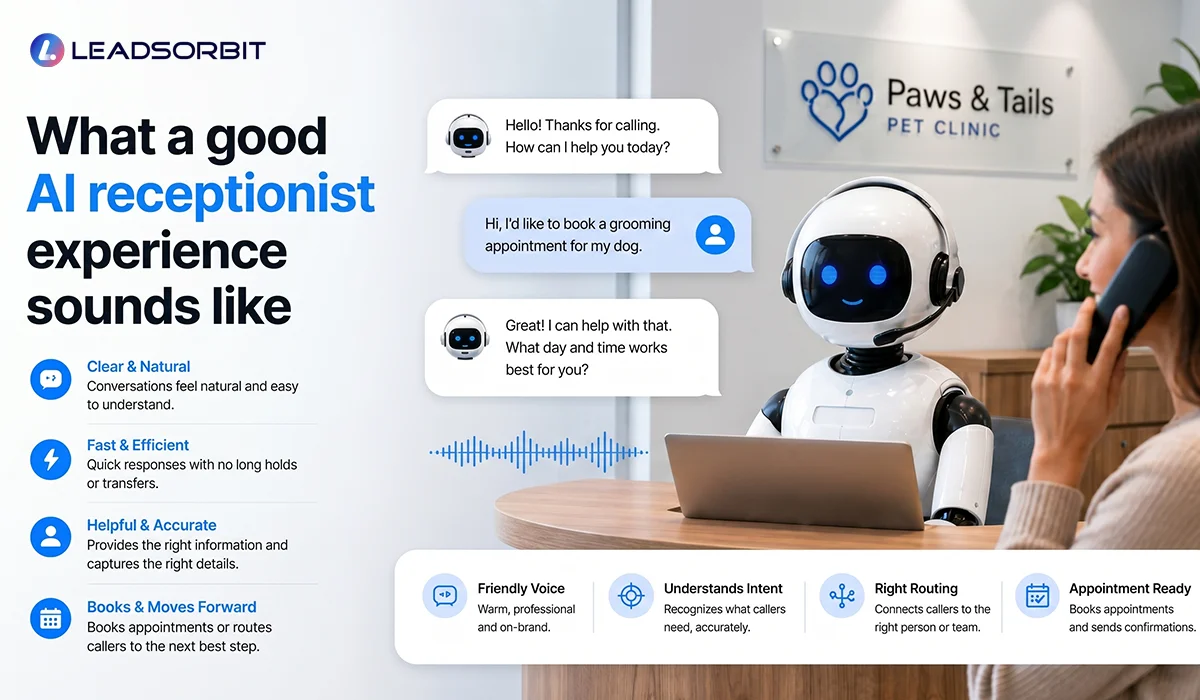
1. It Should Feel:
- Clear
- Calm
- Helpful
- Structured
- Easy to follow
2. It Should Not Feel:
- Robotic
- Confusing
- Too long
- Overly scripted
- Like a dead end
3. A Good Caller Experience Should Quickly Answer:
- Did I reach the right business?
- Can they help me?
- What do I do next?
- Will someone follow up?
- Can I book now?
If the system cannot answer those questions well, it will not feel useful even if the technology is strong.
Try LEADSORBIT free for 14 days
A Simple AI Receptionist Workflow for Small Business
Here is a practical model.
Step 1: Call comes in.
Step 2: AI receptionist greets the caller.
Step 3: Caller explains what they need.
Step 4: System identifies the intent.
Step 5: System asks only the most relevant questions.
Step 6: Caller is routed to one of these next steps:
- Answered directly
- Transferred to staff
- Moved into booking
- Sent to structured voicemail or next day follow up
Step 7: Lead details are saved and visible to the team.
This is where AI Receptionist and AI Appointment work well together. One supports the first interaction. The other helps move the lead toward a booking outcome.
If you want to evaluate tools more critically before launch, the related post is AI Receptionist Software Checklist.
Setup Checklist & Metrics After Launch
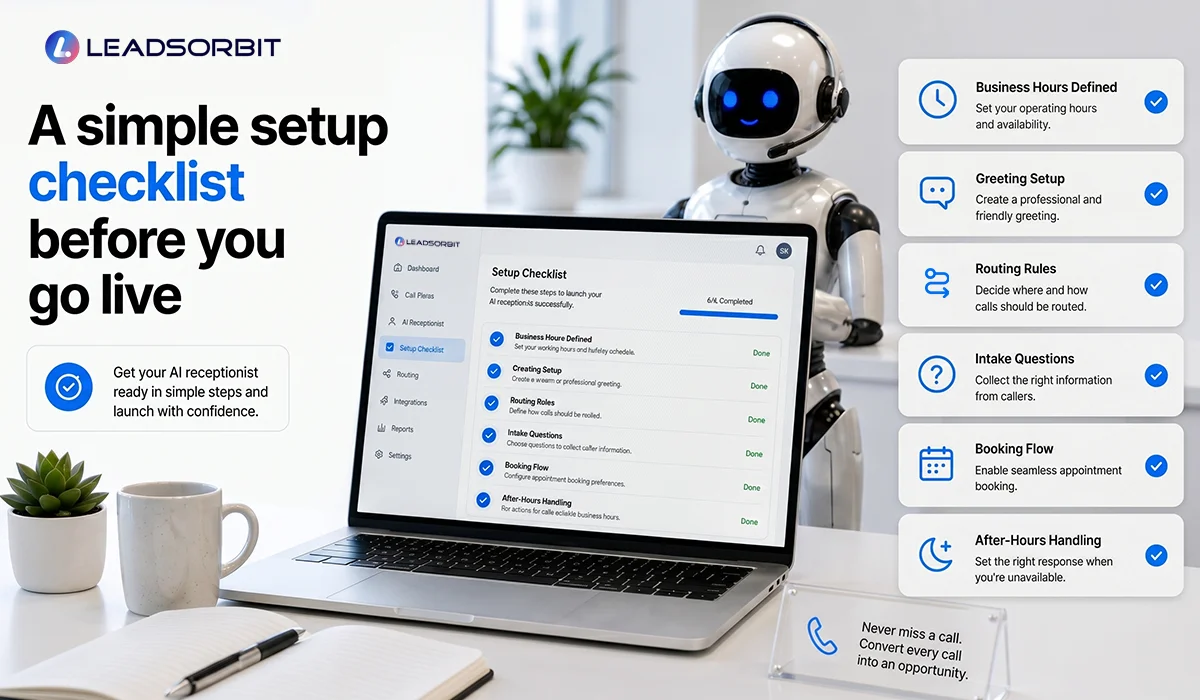
1. A Simple Setup Checklist Before You Go Live
Use this checklist before launch:
- Define business hours and after hours behavior
- Write the greeting in plain language
- Decide what common questions the system should answer
- List the intake questions it should ask
- Define when the call should transfer to a human
- Decide when the caller should be routed to booking
- Test both business hours and after hours experiences
- Review how lead details will be saved for the team
- Listen to real test calls before going live
That one checklist can save a lot of frustration later.
2. What to Track After Launch
You should not judge the system only by whether it sounds impressive. Track what it improves.
3. Missed Call Recovery Rate
Definition: The percentage of calls that still become active opportunities even when staff do not answer live.
What improvement looks like: Fewer dead end missed calls.
4. Call Routing Success
Definition: How often the system gets the caller to the right next step.
What improvement looks like: Fewer wrong transfers and fewer confused callers.
5. Lead Capture Completeness
Definition: How often the system collects the details your team actually needs.
What improvement looks like: Better handoff quality and less repeat questioning.
6. Call to Booking Rate
Definition: The percentage of inbound callers who become a booked appointment or qualified next step.
What improvement looks like: Better conversion from phone demand.
7. After Hours Capture Rate
Definition: The share of off hours callers who still enter the workflow properly.
What improvement looks like: Fewer opportunities disappearing overnight.
How LEADSORBIT Helps Small Businesses Use AI Receptionists Practically
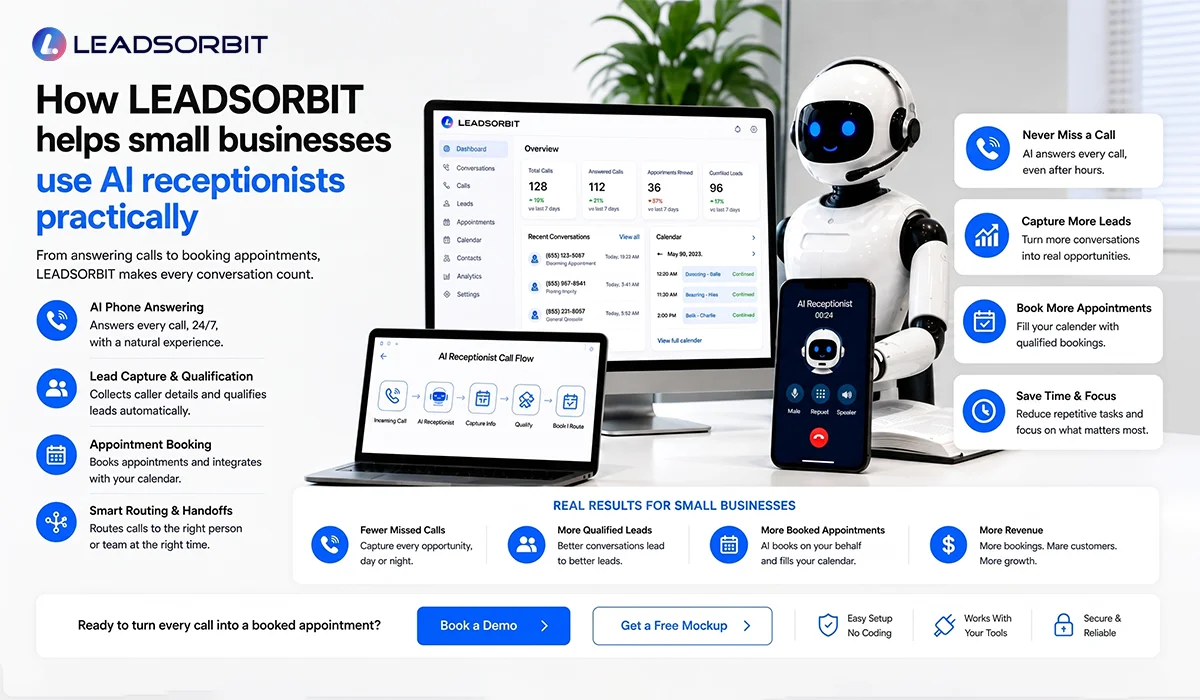
The goal is not to add another tool for the sake of looking modern.
The goal is to create a better front end response system.
Here is the practical mapping:
- AI Receptionist helps answer, route, and recover inbound opportunities
- AI Appointment helps connect calls to scheduling and next step flow
- LEADSORBIT helps small businesses design the workflow around the tool, not just turn on a feature
- That usually leads to fewer missed opportunities, cleaner intake, and a better caller experience
If you want to see what that could look like for your business, a Book a Demo is the easiest next step.
FAQs
It is a phone based conversational system that helps answer calls, capture caller details, route inquiries, and support next steps like booking or follow up when your team cannot handle everything live.
Final Thoughts
Here are the main takeaways:
- An AI receptionist is more than a voicemail upgrade
- It helps answer calls, capture intent, route inquiries, and support booking
- The value comes from workflow design, not just the technology itself
- A good setup asks the right questions without making the caller work too hard
- The best systems support both business hours and after hours call handling
- You should judge it by lead capture, routing quality, and booking outcomes
- For small businesses, the goal is better responsiveness without adding more front desk pressure

Start Your Free 14 Day Trial
Try LEADSORBIT and see how it captures missed calls, follows up instantly, and turns leads into booked appointments for your business.
Personal Message from Faisal Zulfiqar
A lot of small business owners hear the phrase “AI receptionist” and are not sure what to make of it.
That is completely fair.
The term can sound bigger and more complicated than what it really needs to be.
For me, the real value is simple.
Can it help your business answer better, capture more of the calls you are already getting, and make life easier for your team?
That is the standard I care about.
LEADSORBIT is built to turn that idea into a practical workflow, not just a flashy feature.
And when it is set up the right way, it can remove a lot of avoidable friction from your front end process.