
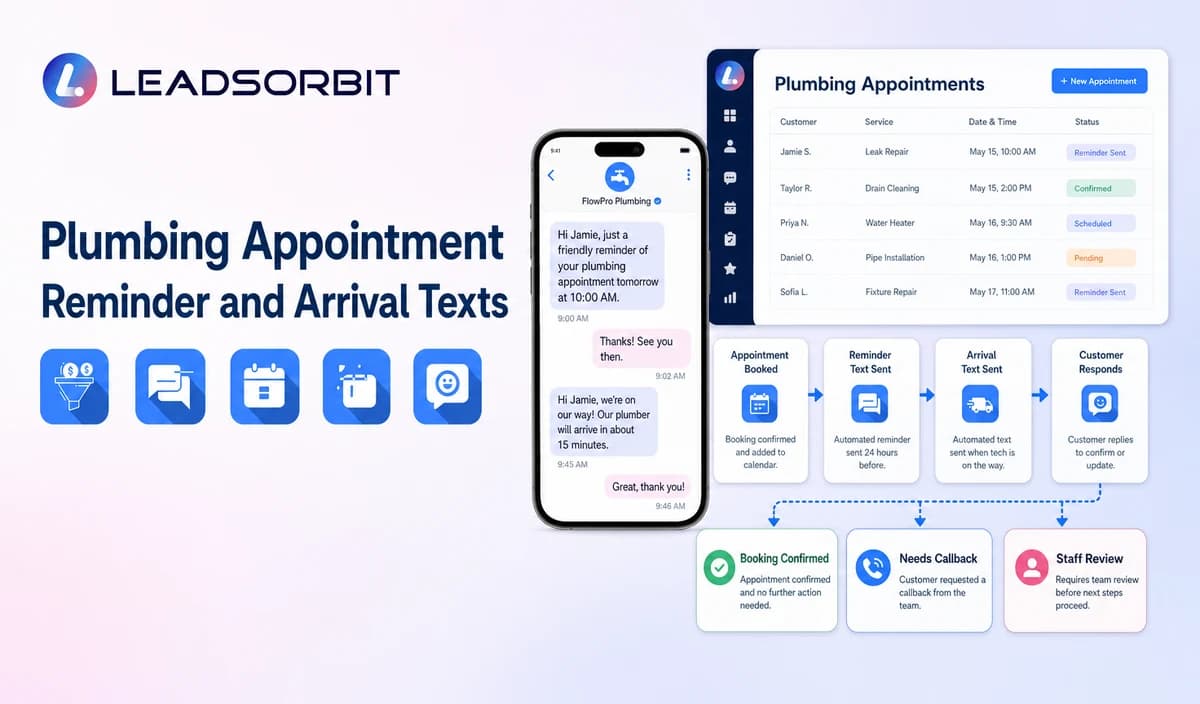

A plumbing appointment reminder should do more than inform a customer that a service date is approaching. A useful reminder helps customers understand their appointment status, confirm the correct service window, prepare any approved information needed before arrival, and easily request changes when something needs to be updated.
For plumbing companies, appointment communication is an important part of the customer journey. After a customer books a service request, the business needs a reliable way to maintain communication without creating confusion or making promises that are not supported by actual appointment information.
A well designed reminder workflow helps ensure that customers receive the correct information at the right time. It also helps office teams manage confirmations, rescheduling requests, cancellations, and customer questions without depending on manual follow up for every interaction.
However, appointment reminders should always be connected to accurate booking information. A reminder should confirm what the business knows, not create assumptions about arrival times, technician location, or service completion.
This guide explains how plumbing companies can create reliable appointment reminder and arrival communication workflows while keeping customer expectations clear.
The broader appointment management framework is covered in appointment booking CRM for small business.

Who This Guide Is For
This guide is designed for plumbing companies that want to improve how they communicate with customers before scheduled service.
It is useful for:
- Plumbing companies standardizing appointment confirmation and reminder messages.
- Office teams managing residential and commercial service appointments.
- Multi location plumbing businesses maintaining consistent customer communication.
- Businesses creating arrival updates while avoiding unsupported ETA promises.
For many plumbing companies, the challenge is not only scheduling appointments. The challenge is keeping customers informed when appointments change, service windows are updated, or additional review is required.
A reliable reminder workflow helps customers understand what happens next while giving office teams better visibility into appointment status.
Why Plumbing Appointment Reminders Matter
Customers often need reassurance after scheduling a plumbing service. They want to know that their appointment was received, when the company expects to provide service, and what they should do if they need to make a change.
Without clear communication, customers may:
- Forget the scheduled service window.
- Assume a request is confirmed when it is still being reviewed.
- Call the office for basic appointment information.
- Miss important updates after a schedule change.
A reminder workflow helps reduce unnecessary confusion by keeping communication connected to the approved appointment record.
For example, a customer who schedules a plumbing visit several days in advance may receive a confirmation immediately after booking and a reminder closer to the service date. If the appointment changes, the workflow should update accordingly and stop sending information related to the previous schedule.
The purpose of automation is not simply sending more messages. The purpose is sending the right message based on the correct appointment status.
Reminder Timing Should Match the Plumbing Service Journey
There is no single reminder schedule that works for every plumbing company. The timing depends on factors such as booking lead time, business hours, service category, customer communication preferences, and the company's operational process.
A reliable workflow should consider the complete appointment journey.
Booking Confirmation
The first message should be sent after a valid appointment is created.
The confirmation should reflect approved information such as:
- Company name.
- Appointment date.
- Service window.
- Approved customer communication options.
The message should not create additional promises that are not available in the appointment record.
For example, if the business provides a service window instead of an exact arrival time, the reminder should communicate that same approved window.
Pre Service Reminder
A pre service reminder helps customers prepare for the upcoming appointment.
This communication may include:
- Appointment date.
- Approved service window.
- General preparation information.
- Options for requesting changes.
The message should remain simple and avoid requesting unnecessary property details or sensitive information.
For example, a reminder may ask customers to ensure the approved access path is available, but it should not request private access codes or unnecessary security information through a routine message.
Same Day Reminder
A same day reminder can help customers remember the scheduled service window and provide an easy way to contact the business if something has changed.
The purpose of this message is clarity, not creating urgency or making additional promises.
A good same day reminder should:
- Confirm the scheduled window.
- Provide a support option.
- Allow customers to request changes.
Arrival Updates
Arrival updates require additional care because they can create stronger customer expectations.
A message such as "your technician is on the way" or "your technician will arrive in 10 minutes" should only be used when the business has verified information supporting that statement.
A reminder system should not create an arrival estimate from a static template.
For example, if the company does not have a connected operational source confirming technician movement, the workflow should use a more general appointment update instead.
This helps maintain accurate communication and prevents customers from receiving information that the business cannot verify.
Rescheduling and Cancellation Updates
Appointment changes are one of the most important parts of reminder management.
When a customer changes or cancels an appointment, the workflow should update the appointment status and stop communication connected to the previous schedule.
For example:
A customer books a plumbing appointment for Monday morning.
Later, the appointment changes to Wednesday afternoon.
The workflow should:
- Update the appointment information.
- Stop the Monday reminder sequence.
- Create communication based on the new appointment.
- Confirm the updated information with the customer.
This prevents customers from receiving outdated reminders.
A Practical Plumbing Appointment Reminder Workflow
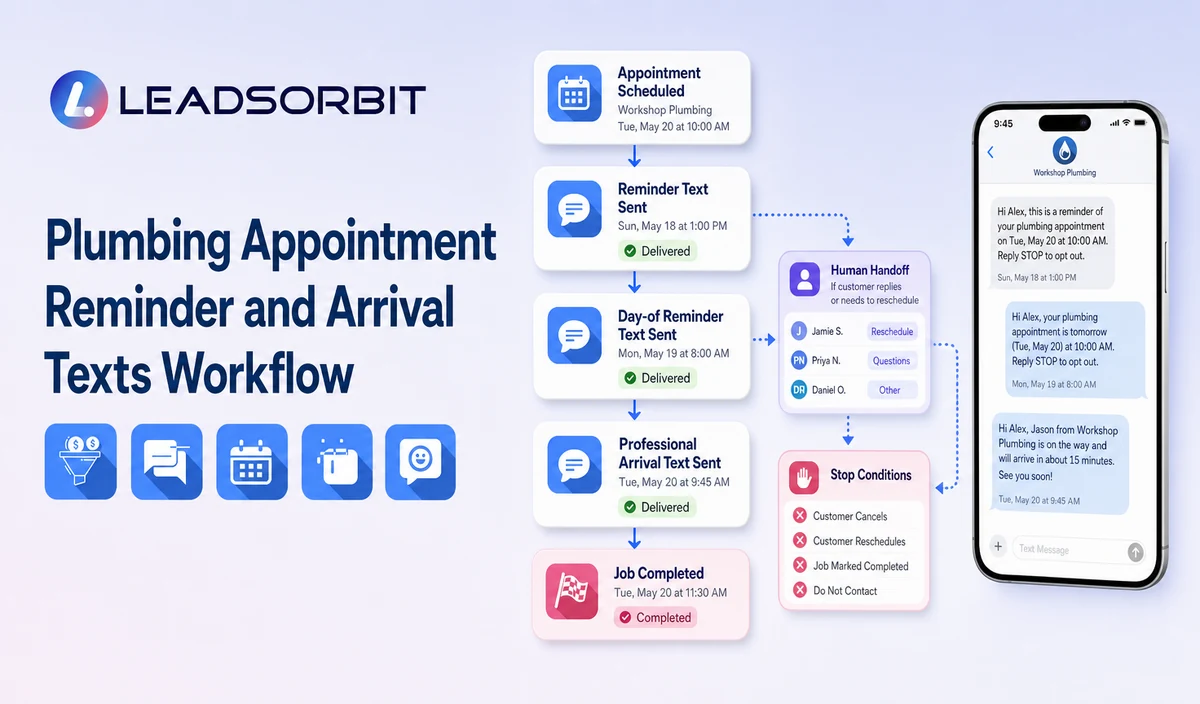
A reliable appointment reminder workflow should follow the actual customer journey.
The process begins when a valid appointment is created and continues through confirmation, reminders, changes, and final status updates.
| Stage | Workflow Action | Staff Responsibility | Stop or Escalation Rule |
|---|---|---|---|
| Valid booking | Create reminder sequence from approved appointment information. | Review appointment details, service category, and customer preferences. | Do not start reminders for unconfirmed requests. |
| Confirmation | Send approved appointment information. | Handle unclear replies or failed delivery. | Replace communication after appointment changes. |
| Pre service reminder | Send reminder and approved preparation information. | Review reschedule or cancellation requests. | Stop after cancellation, reschedule, opt out, or staff takeover. |
| Arrival update | Send only when verified information exists. | Confirm the source and message accuracy. | Do not create unsupported ETA or location claims. |
Reminder Wording by Appointment Stage
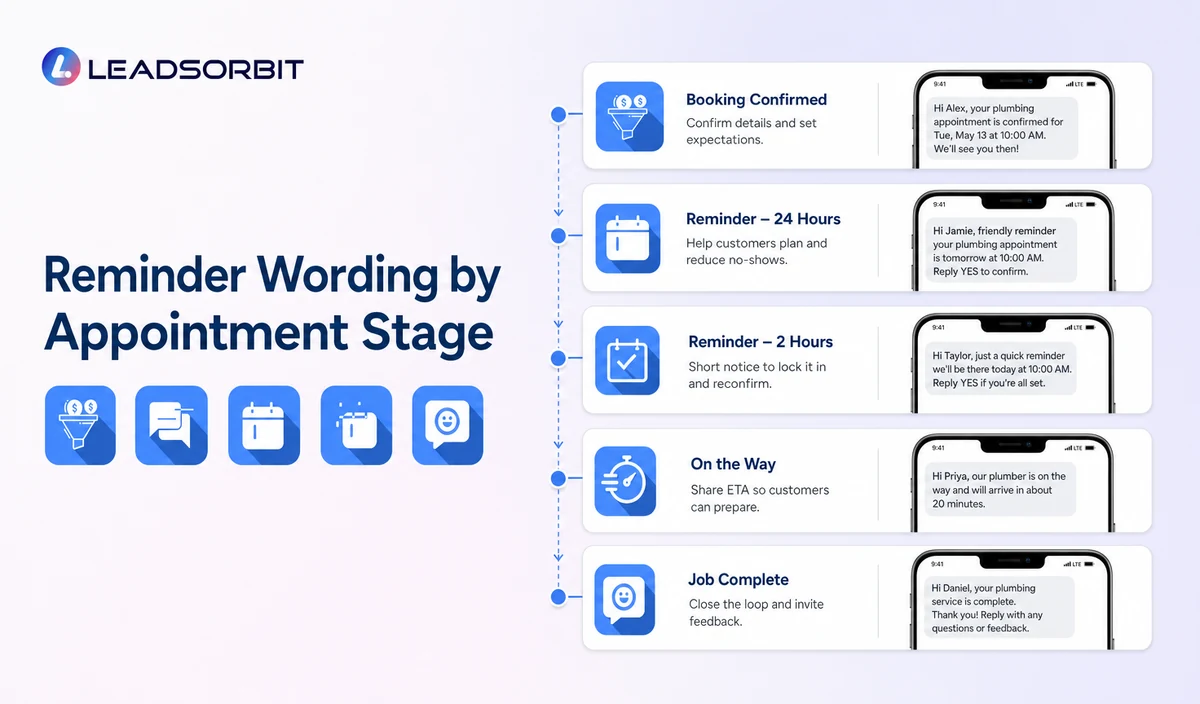
The quality of an appointment reminder depends on whether the message matches the actual appointment status and available information.
A reminder should answer the customer's immediate question:
"What is happening with my appointment, and what should I do next?"
The message should be simple, accurate, and connected to the approved appointment record.
Different appointment stages require different communication.
Booking Confirmation Message
A booking confirmation should be sent after the appointment has been properly created according to the company's scheduling rules.
The purpose of this message is to confirm that the request has moved forward and provide the customer with the information they need.
A good confirmation message may include:
- Company name.
- Appointment date.
- Service window.
- Approved next steps.
- A way to request changes or assistance.
Example:
The message should not promise an exact arrival time unless that information is supported by the company's approved process.
Day Before Reminder Message
A day before reminder helps customers prepare for the upcoming service.
For plumbing businesses, this can be especially useful because customers may need to ensure that the service area is accessible or confirm that the appointment still works for their schedule.
Example:
The reminder should provide useful information without collecting unnecessary details.
For example, asking a customer to make sure the service area is accessible may be appropriate. Requesting private access codes through an automated message is generally not appropriate.
Same Day Reminder Message
A same day reminder should be short and clear.
The goal is to reduce uncertainty, not overwhelm the customer with additional information.
A useful same day message can confirm:
- The company name.
- The scheduled service window.
- The available support option.
Example:
Arrival Update Message
Arrival updates require more careful handling because customers may interpret them as a specific promise.
A plumbing company should only send messages such as:
- "Your technician is on the way."
- "Your technician will arrive in 15 minutes."
- "Your technician has arrived."
when the business has a verified operational source supporting that information.
If the business does not have verified arrival information, the workflow should use a more accurate update.
Example:
This approach protects customer trust and avoids creating inaccurate expectations.
Rescheduled Appointment Message
When an appointment changes, the customer should receive updated information based on the new appointment status.
Example:
The old reminder sequence should stop after a confirmed change.
Cancellation Confirmation Message
A cancellation message should confirm the updated status and provide the next appropriate action.
Example:
Businesses should avoid including cancellation fees, deposits, or policy statements unless those details are verified and approved.
Practical Plumbing Appointment Reminder Workflow Examples
Real customer situations help demonstrate why reminder workflows need clear rules.
Example 1: Customer Books Several Days in Advance
A homeowner schedules plumbing service on Monday for a Friday appointment.
A reliable workflow may:
- Send booking confirmation after approval.
- Send a reminder before the appointment.
- Send a same day reminder if configured.
- Allow the customer to request changes.
The workflow should always use the latest appointment information.
Example 2: Customer Changes the Appointment
A customer originally books Tuesday morning but later requests Thursday afternoon.
A reliable workflow should:
- Update the appointment record.
- Stop Tuesday reminders.
- Create the new reminder sequence.
- Confirm the updated appointment.
Sending the old Tuesday reminder after the change creates confusion and unnecessary customer calls.
Example 3: Customer Replies With a Question
A customer receives a reminder and replies:
The workflow should not continue sending automated reminders without considering the customer's request.
The correct next step may be:
- Create a follow up task.
- Route the conversation to the office.
- Allow staff takeover.
Automation should support communication, not prevent human interaction when needed.
Important Boundaries for Plumbing Appointment Automation
A reliable automation workflow should improve communication while respecting what the system actually knows.
The workflow should not:
- Diagnose plumbing problems.
- Provide repair instructions.
- Estimate damage.
- Promise exact arrival times without verified data.
- Claim technician location without an approved source.
- Guarantee emergency response.
- State unsupported pricing, fees, or policies.
- Continue old reminders after appointment changes.
For example, if a customer writes:
The reminder workflow should not attempt to provide technical advice. The appropriate action is to follow the company's approved escalation process.
This keeps automation within a safe and reliable communication role.
Privacy, Consent, and Customer Data
Appointment reminder workflows may use customer names, phone numbers, service addresses, appointment details, communication preferences, access notes, conversation history, and other business information.
Businesses should collect only the information required for the workflow, limit access to customer information, maintain appropriate consent and opt out records, and review each connected form, calendar, phone or messaging provider, AI tool, integration, retention setting, and data destination separately.
Operational communication and promotional communication should remain separate.
For example:
An appointment confirmation message and a marketing campaign are different communication types and should not automatically be treated the same.
Businesses should also review applicable communication requirements, including consent records, opt out handling, sender identity, and message purpose.
The FCC consent and revocation order discusses consent and reasonable revocation methods for certain automated communications. Businesses should review their specific audience, message type, technology, consent records, and jurisdiction with qualified advisers.
Common Plumbing Appointment Reminder Mistakes
Sending Reminders From Incorrect Appointment Data
A reminder is only useful when it reflects the current appointment record.
Incorrect dates, old service windows, or outdated customer information create unnecessary confusion.
Treating Requests as Confirmed Appointments
A customer submitting a request does not always mean an appointment has been accepted.
Businesses should define the point where a request becomes a confirmed appointment.
Using Static Templates for Arrival Promises
A template should not claim:
"Your technician is arriving in 10 minutes"
unless the business has verified information supporting that statement.
Forgetting to Stop Old Messages
When appointments change, old reminders should stop.
Otherwise, customers may receive conflicting information.
Leaving Customer Replies Without Ownership
Messages such as:
- HELP
- CHANGE
- CANCEL
should have a defined process and responsible team member.
Plumbing Appointment Workflow Setup Checklist
Before launching an automated reminder workflow, plumbing companies should confirm:
- Appointment statuses are clearly defined.
- Calendar information is accurate.
- Service windows are approved.
- Customer communication preferences are considered.
- Confirmation messages are reviewed.
- Reminder messages match actual appointment information.
- Rescheduling and cancellation paths are configured.
- Arrival updates only use verified information.
- Customer replies have an assigned owner.
- Permissions and integrations are reviewed.
- Test scenarios are completed.
Testing should include:
- New appointments.
- Rescheduled appointments.
- Cancelled appointments.
- Duplicate bookings.
- Customer questions.
- Staff takeover situations.
A workflow becomes reliable when it handles both normal and unexpected situations.
What to Measure
Plumbing companies can evaluate appointment communication workflows by reviewing:
- Confirmation responses.
- Failed or undelivered reminders.
- Reschedule requests handled correctly.
- Cancellation requests routed properly.
- Outdated messages stopped after changes.
- Customer replies without an assigned owner.
- Incorrect appointment updates.
These measurements help businesses improve workflow accuracy and communication quality.
How LEADSORBIT Supports This Plumbing Workflow
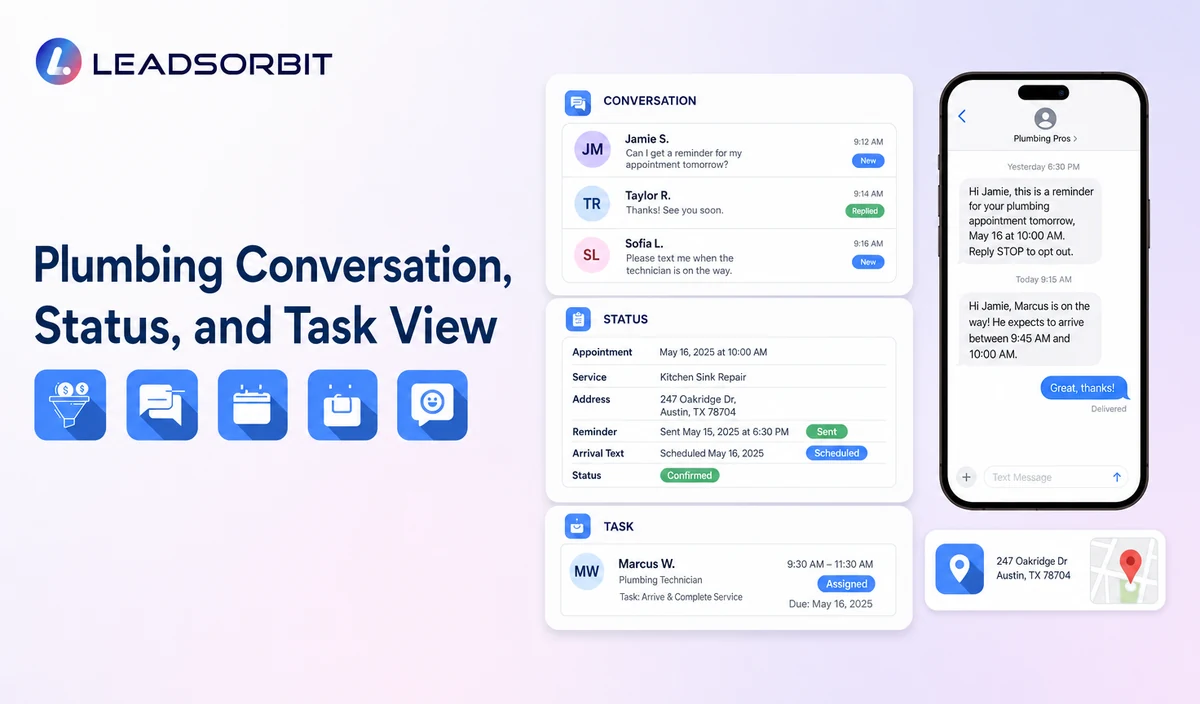
LEADSORBIT’s AI powered CRM helps businesses organize approved customer conversations, appointment activity, follow up actions, tasks, and workflow statuses through a connected CRM workflow.
For plumbing companies, this can support the communication journey from customer interaction to appointment management by helping organize:
- Customer conversations.
- Appointment related activities.
- Follow up tasks.
- Workflow actions.
- Customer communication history.
AI Appointment can support configured appointment workflows, including appointment requests, calendar connections, confirmations, reminders, rescheduling, and cancellation processes where the required setup is available.
Workflow AI can support configurable triggers, conditions, messages, tasks, timing, and workflow actions based on approved business rules.
The exact channels, fields, scripts, calendars, service areas, appointment rules, estimate or plan data, permissions, retention settings, integrations, and account behavior require implementation validation.
LEADSORBIT is positioned in this article as the communication, booking, follow up, CRM, review, and task layer. It should not be presented as a complete field service management, dispatch, route optimization, work order, estimating, invoicing, inventory, payroll, job costing, permit, price book, accounting, or technician tracking system.
Try LEADSORBIT free for 14 days
FAQs
A plumbing appointment reminder should include the company name, valid appointment date or service window, and an approved way for the customer to request changes or assistance.
Final Thoughts
Plumbing appointment reminder texts work best when they are connected to accurate appointment information, clear business rules, and reliable customer communication processes.
A successful workflow does not simply send messages. It helps customers understand their appointment status, gives employees better visibility, and creates clear paths for changes, questions, and staff assistance.
The strongest plumbing automation workflows confirm what the business knows, avoid unsupported promises, and keep customers informed at every stage.
Start 14 Days Free Trial to see how LEADSORBIT can support plumbing appointment workflows with conversations, appointment requests, automation, tasks, and CRM visibility.

Start Your Free 14 Day Trial
Try LEADSORBIT and see how it captures missed calls, follows up instantly, and turns leads into booked appointments for your business.