
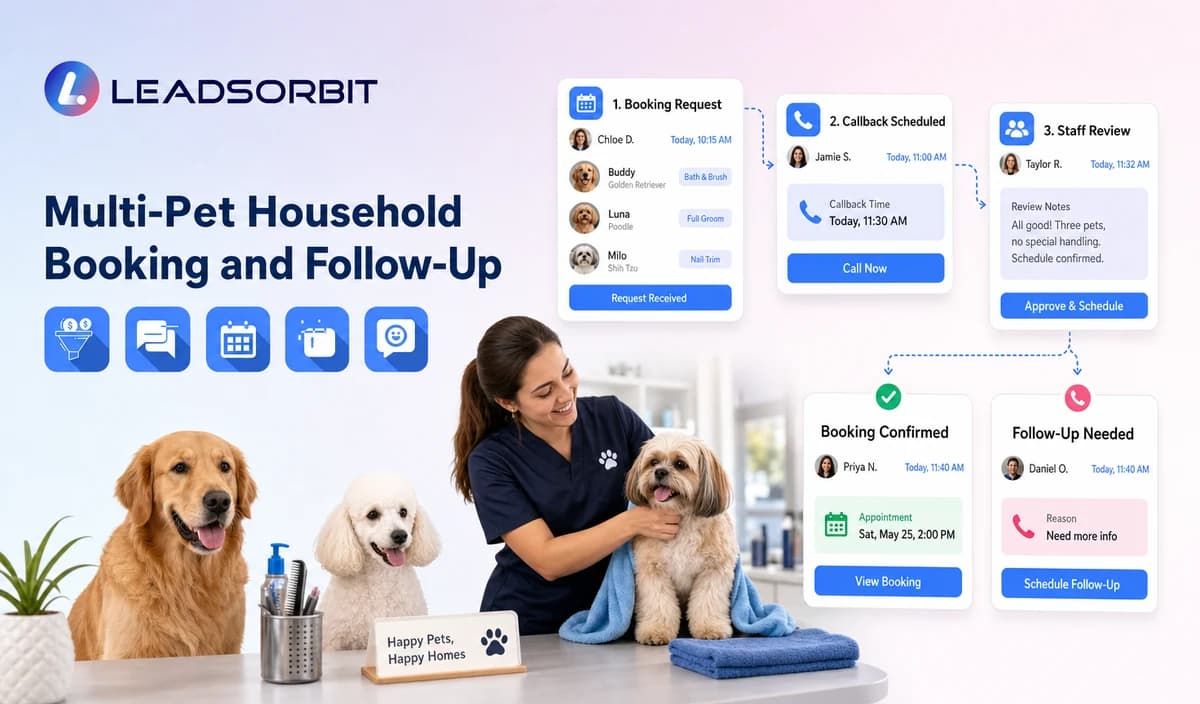

Pet grooming businesses often build long term relationships with pet owners, but the service itself is delivered to individual pets. When one household has multiple pets, managing appointments, services, reminders, and communication requires more than a single customer record.
A reliable multi pet grooming workflow connects the household relationship while keeping each pet’s information separate. This helps grooming teams understand which pet needs which service, which appointment is changing, and which follow up action is required.
This supporting guide applies the broader LEADSORBIT small business workflow framework to the specific needs of pet grooming businesses managing multi pet households.

Who This Guide Is For
This guide is designed for:
- Grooming businesses serving customers with multiple pets.
- Salon teams managing households with several dogs or cats.
- Mobile groomers coordinating multiple pets from the same owner.
- Multi location grooming businesses maintaining consistent customer records.
- Teams that need better visibility into pet specific bookings and follow up actions.
A multi pet workflow is especially useful when one customer regularly schedules different services for multiple pets, such as:
- Full grooming for one pet
- Bath only service for another pet
- Nail trimming or maintenance service for another pet
- Different appointment schedules based on each pet’s needs
Why Multi Pet Grooming Workflows Need Separate Pet Context
A common challenge in pet grooming is that the customer relationship belongs to the owner, but the service relationship belongs to each individual pet.
For example, a customer may have three dogs:
- Max requires a full grooming appointment.
- Bella only needs a bath and nail service.
- Charlie may have a different appointment schedule.
Although these pets belong to the same household, each pet has different service information, appointment requirements, and communication needs.
A strong workflow should maintain:
| Relationship Level | Information Managed |
|---|---|
| Owner Level | Customer name, contact details, communication preferences, consent |
| Household Level | Shared relationship between owner and pets |
| Pet Level | Pet name, service history, appointment details, preferences |
| Appointment Level | Date, service, status, changes, and follow up actions |
Keeping these levels separate helps prevent common mistakes such as:
- Sending the wrong reminder for the wrong pet.
- Applying one pet’s service details to another pet.
- Updating all appointments when only one pet’s booking changes.
- Losing visibility when multiple pets have different schedules.
A Real World Multi Pet Grooming Example
Consider a grooming salon that receives a booking request from a customer with three pets.
The owner requests appointments for:
Max
- Full grooming service
Bella
- Bath and nail trim
Charlie
- Puppy grooming session
The owner prefers appointments on the same day.
Without a structured multi pet workflow, the team may face challenges:
- The wrong service may be attached to the wrong pet.
- Appointment duration may be unclear.
- A reminder may mention only one pet.
- A cancellation request for one pet may accidentally affect all bookings.
With a properly organized workflow:
- The owner remains connected to all pets through one household profile.
- Each pet keeps its own service and appointment information.
- Staff can update only the affected pet when changes occur.
- Communication remains accurate and personalized.
The goal is not to automate every decision. The goal is to help the team maintain accurate information and provide better customer communication.
Key Difference: Customer Record vs Pet Record
Many grooming businesses manage customers correctly but do not separate pet information clearly.
A customer record answers:
“Who is booking the service?”
A pet record answers:
“Which pet is receiving the service?”
Both are important, but they serve different purposes.
Example:
Customer Record
Name: Sarah Williams
Contact: Phone number and communication preferences
Household: Three pets
Pet Records
Max
- Grooming service
- Appointment history
- Pet specific notes
Bella
- Bath service
- Appointment schedule
Charlie
- Puppy grooming
- Follow up requirements
A successful multi pet workflow should help businesses move from booking requests to completed appointments while maintaining accurate pet level information.
| Stage | Workflow Action | Staff Responsibility | Stop or Escalation Rule |
|---|---|---|---|
| 1. Identify Household | Confirm owner details and household relationship. | Review duplicate customer records and confirm correct owner information. | Do not merge unrelated customers. |
| 2. Create Individual Pet Profiles | Create separate records for each pet connected to the owner. | Confirm pet names and required operational details. | Do not copy information from one pet to another. |
| 3. Capture Service Requirements | Record the specific service requested for each pet. | Review different service needs and exceptions. | Do not assume all pets require the same service. |
| 4. Understand Scheduling Needs | Identify whether pets should be booked together or separately. | Review availability, timing, and business rules. | Do not promise combined availability without confirmation. |
| 5. Manage Appointment Status | Maintain separate appointment information while keeping household context connected. | Confirm booking updates and changes. | Do not treat one pet’s booking as confirmation for every pet. |
| 6. Send Follow Up Communication | Send accurate reminders related to the correct pet or approved household booking. | Review message clarity and accuracy. | Stop outdated communication after changes. |
| 7. Handle Changes | Update only the affected pet or appointment. | Create tasks for partial changes or special requests. | Do not automatically cancel or modify every pet unless requested. |
Household and Pet Level Data Rules
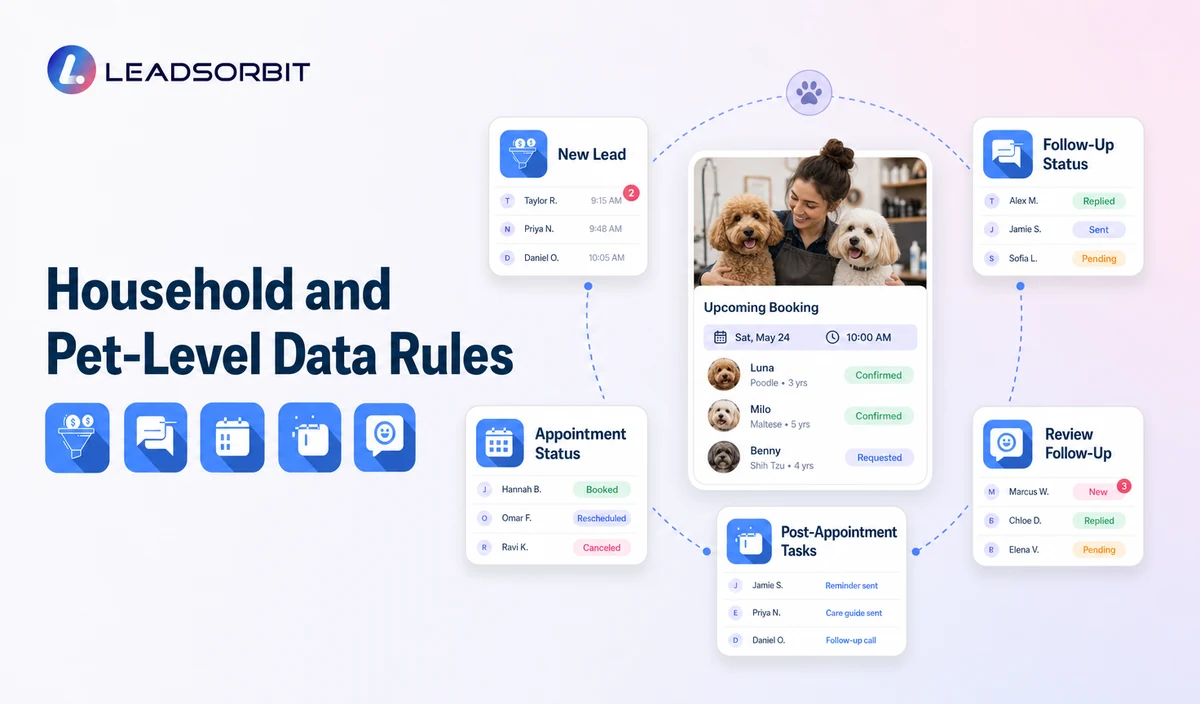
A multi pet grooming workflow works best when businesses clearly understand which information belongs to the owner, which information belongs to each pet, and which information belongs to each appointment.
The goal is to create connected records without mixing details between pets.
Use this decision guide to maintain accurate communication and booking information.
| Information Type | How It Should Be Managed | Important Consideration |
|---|---|---|
| Owner Record | Store shared customer information such as name, contact details, communication preferences, and consent status. | One household owner record should only be created when the relationship is accurate. |
| Pet Record | Maintain separate profiles for each pet, including pet name, service requirements, and operational details. | Never overwrite one pet’s information with another pet’s details. |
| Appointment Record | Keep appointment status connected to the correct pet. | One confirmed appointment should not automatically represent every pet in the household. |
| Reminder Communication | Mention the correct pet or clearly identify multiple pets included in the appointment. | Avoid unclear reminders that could confuse owners. |
| Booking Changes | Apply updates only to the affected pet or appointment. | Confirm whether the owner wants changes for one pet or the entire household. |
| Package or Membership Information | Use only verified information about package scope, benefits, or eligibility. | Do not assume shared benefits across multiple pets. |
Why Pet Level Information Matters in Grooming Businesses
A household may have multiple pets, but each pet can have a different grooming journey.
For example:
A customer may own:
- A senior dog receiving maintenance grooming.
- A young puppy receiving introductory grooming appointments.
- A long haired breed requiring more frequent grooming services.
Although these pets belong to the same owner, their appointments and communication should remain separate.
Accurate pet level records help businesses:
- Provide the correct service information.
- Reduce booking mistakes.
- Avoid confusing reminders.
- Improve staff preparation before appointments.
- Maintain a better understanding of returning customers.
Single Pet vs Multi Pet Grooming Management
Understanding the difference between a normal booking workflow and a multi pet workflow helps businesses build better processes.
| Single Pet Management | Multi Pet Household Management |
|---|---|
| One customer connected to one pet | One customer connected to multiple pets |
| One service requirement | Different services for different pets |
| One appointment status | Multiple appointment statuses |
| Simple reminder communication | Pet specific or carefully combined reminders |
| Basic customer history | Household relationship with separate pet histories |
A multi pet workflow does not replace normal booking processes. It adds an additional layer that helps businesses manage more complex customer relationships.
Practical Multi Pet Grooming Communication Examples
Combined Booking Request
Customer Request:
A clear workflow should help the business confirm:
- Which services each pet requires.
- Whether the owner wants appointments together.
- Whether separate appointment times are needed.
- Which pet each service applies to.
Combined Appointment Reminder
Example:
This keeps the communication clear while recognizing that multiple pets are involved.
Partial Appointment Change
Example:
This prevents accidental changes to unrelated bookings.
Staff Review Request
Example:
Complex situations should always allow staff involvement.
Important Pet Grooming Boundaries
Multi pet workflows should improve organization, but they should not make unsupported assumptions.
Businesses should avoid:
- Copying health, behavior, medication, vaccination, or sensitive information from one pet to another.
- Assuming every pet requires the same service.
- Applying one price, package, or duration to every pet without verification.
- Promising combined appointment availability before confirmation.
- Making automated decisions about special handling requirements.
LEADSORBIT is positioned here as the communication, booking, follow up, CRM, review, and task layer.
It should not be presented as a complete pet grooming operations system, staff/resource scheduling platform, mobile route optimization tool, pet medical record system, vaccination record system, POS system, inventory system, payroll system, package accounting system, recurring billing platform, or checkout system.
Privacy, Consent, and Pet Owner Data
Pet grooming businesses manage both customer information and pet related operational information.
This may include:
- Customer names
- Phone numbers
- Communication preferences
- Pet names
- Service preferences
- Appointment details
- Grooming notes
- Membership or package information
- Conversation history
- Location information when required for business operations
Businesses should collect only the information required for the workflow.
Good practices include:
- Keeping consent and communication preferences visible.
- Limiting access based on staff responsibilities.
- Reviewing connected tools and integrations.
- Maintaining accurate records.
- Separating operational appointment communication from promotional messages.
Each form, calendar, messaging provider, CRM integration, AI tool, and data destination should be reviewed according to the business process and applicable requirements.
Common Multi Pet Workflow Mistakes
Many booking issues happen because businesses treat a household as one single record instead of multiple connected pet relationships.
Common mistakes include:
Using One Pet Field for an Entire Household
A single field can create confusion when multiple pets require different services.
Overwriting Pet Information
Updating one pet’s details should not replace another pet’s information.
Confirming One Appointment for Every Pet
Each pet should have a clear appointment status.
Sending Unclear Reminders
Messages should clearly identify which pet or appointments are included.
Applying One Cancellation to All Pets
A change affecting one pet should not automatically affect other pets.
Assuming Shared Packages or Benefits
Package information should only be applied when the source data confirms the correct scope.
Implementation Checklist
Before launching a multi pet workflow, businesses should:
✅ Define the relationship between owner records and pet records.
✅ Create separate fields for each pet.
✅ Decide when appointments should be linked or separated.
✅ Approve pet specific and household communication formats.
✅ Create handling rules for partial changes and cancellations.
✅ Validate package or membership information sources.
✅ Test workflows using households with multiple pets.
✅ Review duplicate names and duplicate customer records.
What to Measure
Businesses can evaluate workflow quality by tracking:
- Complete household records.
- Accurate pet profiles.
- Booking requests organized by pet.
- Correctly linked appointments.
- Duplicate communication issues.
- Reminder accuracy.
- Partial change handling.
- Staff tasks created for exceptions.
- Data corrections required.
The goal is not simply sending more messages. The goal is creating accurate communication that helps staff and customers.
How LEADSORBIT Supports This Workflow
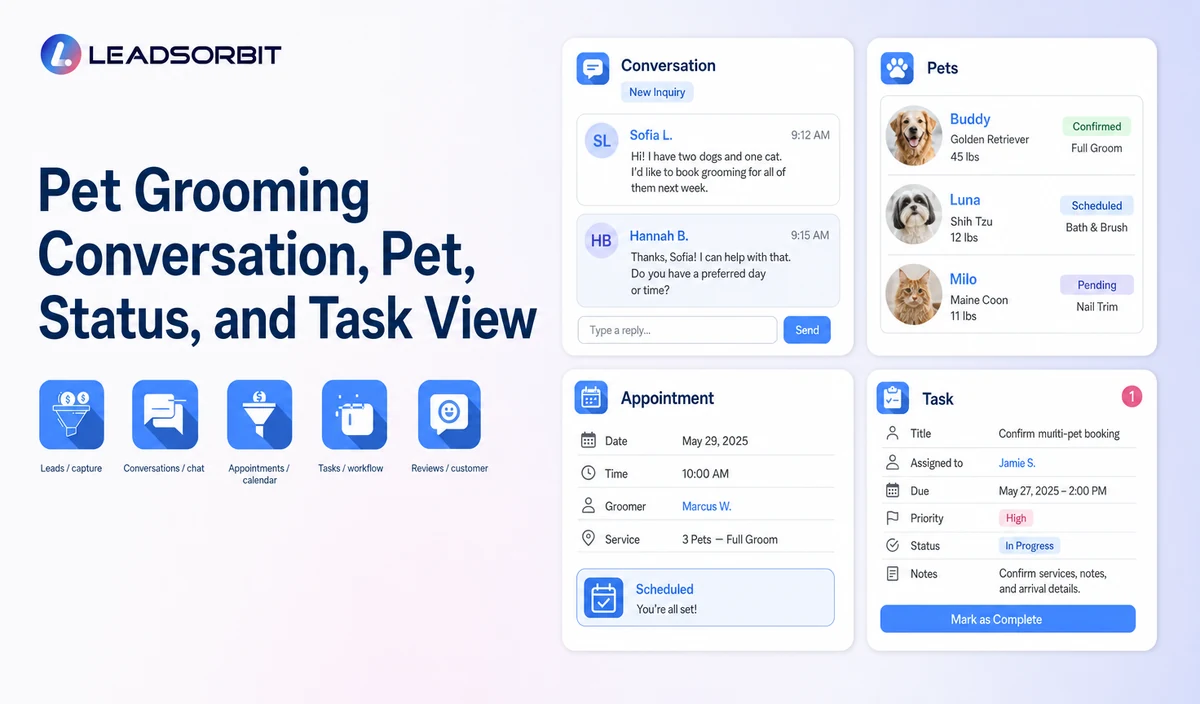
LEADSORBIT’s pet grooming CRM can help businesses organize approved customer conversations, appointment requests, reminders, follow up activities, reviews, tasks, and workflow information.
Relevant capabilities include:
- AI Appointment: Supports appointment requests, calendar interactions, confirmations, reminders, rescheduling, and cancellations where configured.
- Workflow AI: Supports configurable triggers, conditions, messages, tasks, timing rules, and workflow actions based on business requirements.
- Conversation AI: Supports configured channel conversations, routing, staff takeover, and CRM visibility where enabled.
Exact channels, fields, calendars, appointment rules, package sources, permissions, integrations, and account behavior require implementation validation.
LEADSORBIT should be positioned as the communication, booking, follow up, CRM, review, and task layer that helps businesses manage customer interactions more effectively.
See the Workflow With Your Business Rules
Start 14 days free trial to understand how LEADSORBIT can support your pet grooming workflow with customer communication, booking requests, reminders, tasks, and CRM visibility.
Try LEADSORBIT free for 14 days
FAQs
A multi pet grooming booking workflow connects one owner household with separate pet profiles, services, appointments, reminders, and communication history. It helps grooming businesses manage multiple pets without mixing information between them.
Final Thoughts
A multi pet grooming booking workflow helps businesses maintain a strong customer relationship while keeping every pet’s information accurate.
The best workflows connect the owner household with individual pet profiles, separate appointment details, clear communication, and reliable follow up processes.
By maintaining accurate records and giving staff the right context, grooming businesses can reduce booking confusion and create a smoother experience for both customers and their pets.
Start 14 Days Free Trial
Start 14 days free trial to see how LEADSORBIT can support pet grooming workflows with conversations, booking requests, reminders, automation, tasks, and CRM visibility.

Start Your Free 14 Day Trial
Try LEADSORBIT and see how it captures missed calls, follows up instantly, and turns leads into booked appointments for your business.