
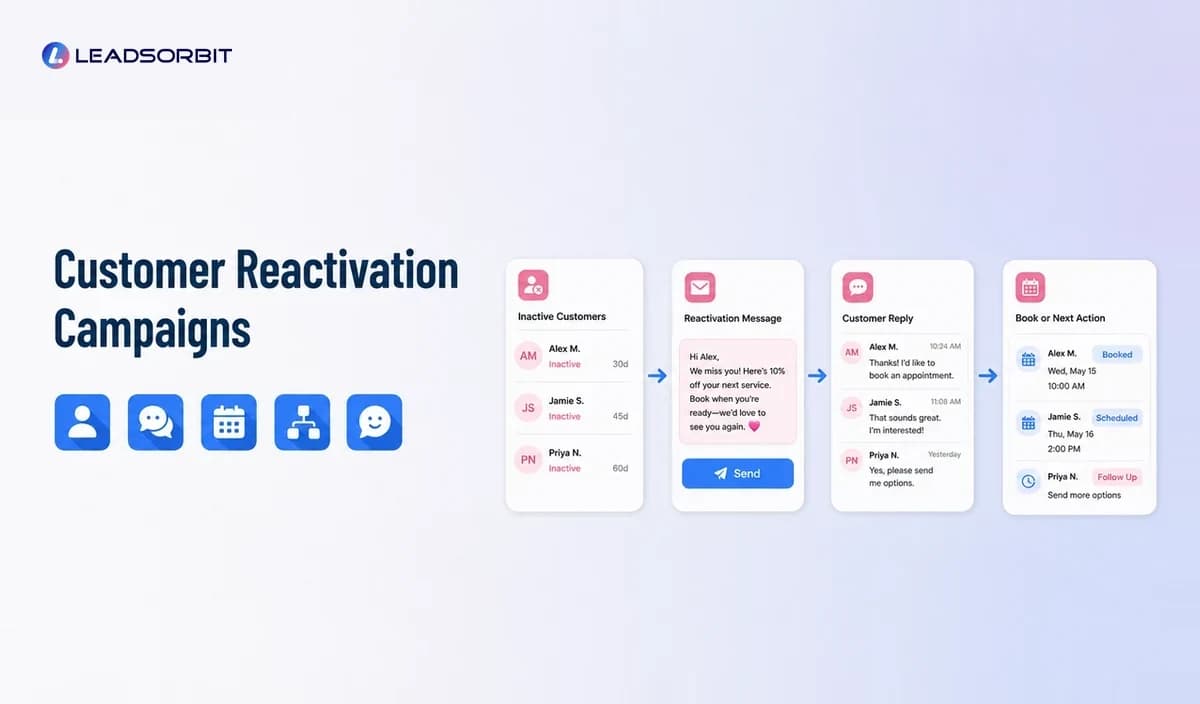

Most small businesses have inactive customers and old leads sitting inside spreadsheets, inboxes, booking tools, or CRM records. Some no longer need the service, but others may simply have become busy, missed a reminder, postponed a decision, or lost contact with the business.
Customer reactivation campaigns create a structured way to reconnect with appropriate contacts. They are part of a wider customer retention management software strategy, but their specific purpose is to restart conversations with people who already know the business.
What Is a Customer Reactivation Campaign?
A customer reactivation campaign is a planned sequence of messages and follow up actions designed to reconnect with inactive customers or older leads.
The campaign usually begins with a defined segment, such as customers who have not booked within an expected period, people with unfinished estimates, cancelled appointments, expired memberships, or services that may be due again.
A strong campaign is not a mass message to every old record. It uses customer history, timing, relevance, and clear stopping rules.
Inactive Customer vs Lost Customer
An inactive customer has not engaged within the timeframe the business normally expects. A lost customer is someone the business has reasonably determined is no longer active or suitable for continued contact.
The difference matters because inactivity is not always rejection.
A customer may be inactive because:
- The need has not returned yet
- They forgot to schedule
- The timing was inconvenient
- The business did not follow up
- They moved or changed circumstances
- A concern was never resolved
- Their preferred channel changed
- Their information is outdated
- They chose another provider
A reactivation campaign should test whether there is still a relevant relationship rather than assuming every inactive record can be won back.
Which Contacts Should Enter a Reactivation Campaign?
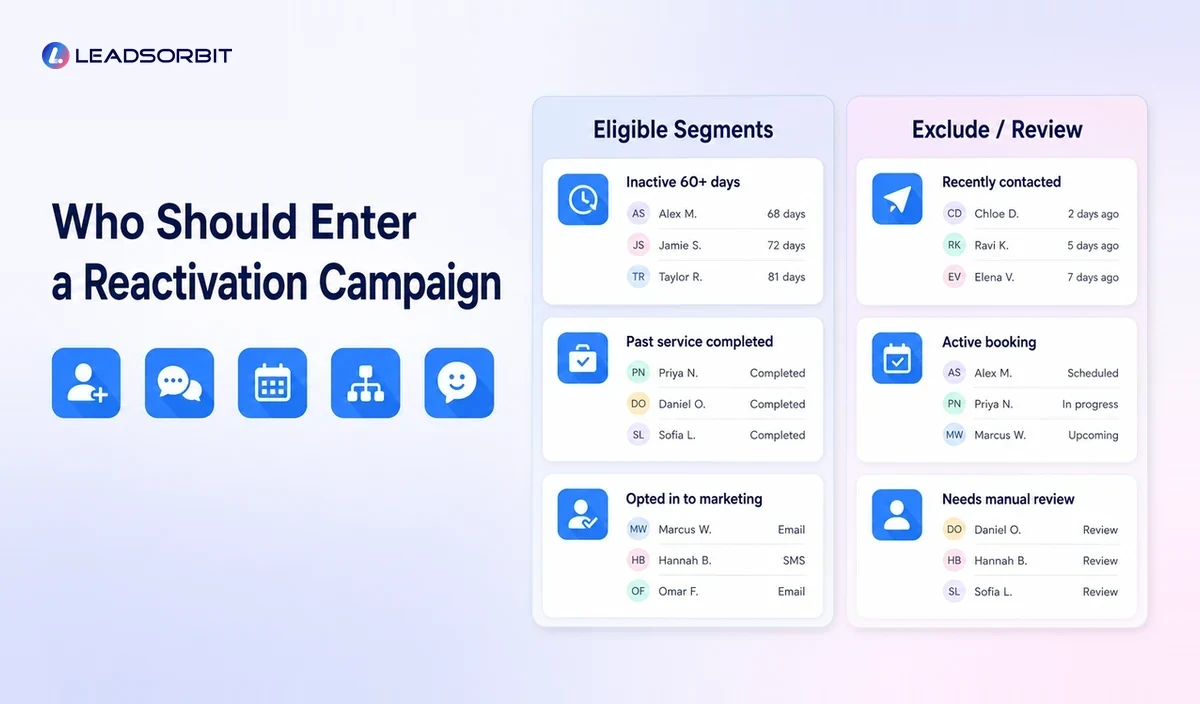
Segmentation is the most important planning step.
Useful segments may include:
- Customers overdue for a recurring service
- Customers without a future appointment
- Customers who cancelled and did not reschedule
- Customers with an unfinished service plan
- People who requested an estimate but did not proceed
- Former members or subscribers
- Seasonal customers
- Customers who completed one service but never returned
- Leads that engaged but stopped responding
Exclude contacts when:
- They opted out
- The business has no valid reason or permission to contact them
- A serious complaint remains unresolved
- The record is inaccurate or duplicated
- The service is no longer relevant
- The customer has already booked
- Another active workflow is already communicating with them
A clean segment protects customer trust and makes campaign reporting more meaningful.
How to Plan a Customer Reactivation Campaign
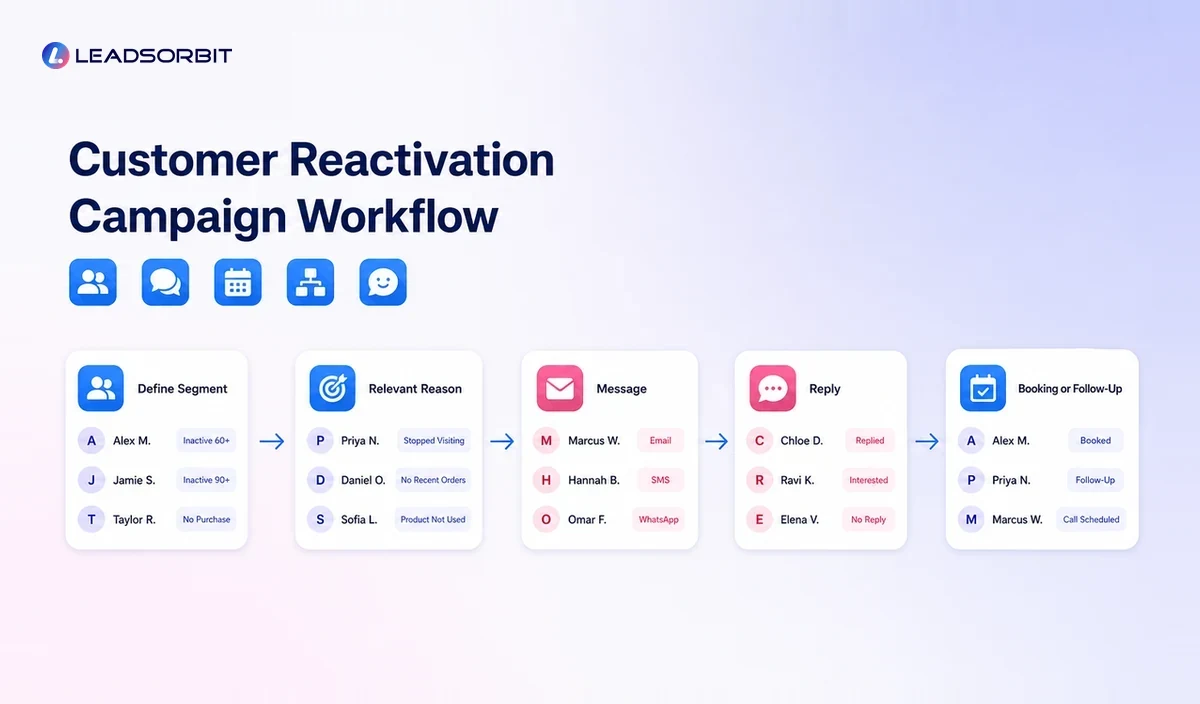
A reactivation campaign should begin with a business reason, not a discount.
Define the Audience
Choose one segment with a shared situation. For example, a pet groomer may select customers whose last appointment was beyond their normal service interval. A home service company may select customers due for seasonal maintenance.
Define the Customer Need
Ask why the message could be useful to the customer now.
The reason might be:
- A recurring service is due
- A seasonal need is approaching
- An appointment was never rescheduled
- A project or estimate remains unfinished
- A membership or plan expired
- New availability makes booking easier
- A previous service naturally leads to another step
Choose One Desired Action
A campaign should have one primary next step, such as reply, book, call, update preferences, or confirm that the service is no longer needed.
Write a Relevant Message
A useful reactivation message usually contains:
- Recognition of the prior relationship
- A clear reason for contacting the customer
- A simple next step
- A way to ask for help
- A respectful opt out option where required
Avoid pretending the message is personal when it is automated. The tone can be warm without being misleading.
Set the Sequence
A simple sequence may include an initial message, a reasonable reminder, and a final close out step. The number and timing should match the service, channel, relationship, and applicable communication requirements.
Long sequences can create frustration. More messages do not automatically create more useful conversations.
Assign Replies
Customer responses should reach a monitored inbox. Questions, objections, complaints, and booking requests need clear staff ownership.
Conversation AI can help organize and route customer communication, while Workflow AI can manage triggers, tasks, and status changes.
Add Stopping Rules
Stop the campaign when the customer:
- Replies
- Books
- Calls
- Opts out
- Indicates the service is not relevant
- Enters another workflow
- Has an unresolved issue
- Reaches the campaign end
Stopping rules are part of the customer experience, not only a technical setting.
Reactivation Campaign Examples
Appointment Reactivation
A customer cancelled or completed a prior appointment but never booked the next one. The message references the service and offers a simple booking option.
Seasonal Service Reactivation
A home service or auto detailing business contacts customers when a seasonal service becomes relevant. The segment is based on service history and location rather than the entire database.
Estimate Follow Up
A customer received an estimate but did not proceed. The message asks whether the project is still relevant and offers to answer questions or update the estimate.
Membership or Subscription Win Back
A former member receives a concise update about what has changed and a clear path to restart. Avoid making claims or offers that are not available to all eligible contacts.
Inactive Customer Check In
The business sends a simple message asking whether the customer still needs the service. This can be more effective and respectful than assuming the customer wants a promotion.
Should Reactivation Campaigns Use Discounts?
Discounts can be useful in some situations, but they should not be the default strategy.
A discount may attract price sensitive responses without addressing why the customer became inactive. It can also train customers to wait for offers.
Other reactivation reasons include:
- Easier booking
- New service availability
- Seasonal relevance
- A maintenance reminder
- A personal check in
- Improved hours
- A resolved service issue
- Useful educational information
- A clear next appointment window
When an offer is used, explain the terms clearly and avoid artificial urgency.
SMS, Email, and Phone for Reactivation
The best channel depends on the prior relationship and the type of message.
| Channel | Best Use | Main Consideration |
|---|---|---|
| SMS | Short reminders and quick booking prompts | Consent, timing, opt outs, message frequency |
| Detailed updates, educational information, broader campaigns | Accurate sender information, subject lines, unsubscribe process | |
| Phone | High value or complex relationships, service recovery | Staff time, notes, respectful contact attempts |
| Direct mail | Some local or seasonal campaigns | Cost, address quality, slower response cycle |
For commercial email, use the FTC's CAN SPAM compliance guide as an official starting point. For automated calls and texts, review the FCC's current consumer guidance and obtain advice for your exact use case.
Communication rules can vary by message, technology, location, and customer relationship. This article is operational guidance, not legal advice.
How to Measure a Reactivation Campaign
Measurement should focus on meaningful outcomes and customer experience.
Useful measures may include:
- Valid contacts in the segment
- Delivered messages
- Customer replies
- Bookings or next actions
- Opt outs
- Invalid records
- Staff follow up completion
- Customers excluded because of active issues
- Workflow errors or duplicate messages
Do not treat reply rate alone as success. A campaign that creates many complaints or irrelevant conversations is not healthy.
The business should also record why customers remain inactive when that information is available. Those patterns can improve service, timing, and future retention workflows.
How to Improve Reactivation Results
Clean the Data First
Remove duplicates, correct invalid contact details, and check customer status. Poor data creates poor communication.
Make the Message Specific
Reference the genuine relationship or service category without exposing sensitive information.
Use Better Timing
Contact customers when the service is likely to be relevant. Timing should reflect the real service cycle.
Make Booking Easy
Use a clear booking link, reply option, or phone path. Do not send the customer through several steps.
Route Replies Quickly
A reactivation campaign can fail after the customer responds if nobody takes ownership.
Learn From Non Responses
Silence may mean the timing, message, offer, channel, or customer segment is wrong. Adjust the strategy instead of increasing frequency automatically.
Common Reactivation Campaign Mistakes
Messaging the Entire Database
Old records may include duplicates, opt outs, resolved complaints, or customers who are no longer appropriate to contact.
Hiding the Reason for Contact
The customer should understand why the message is relevant.
Using False Personalization
Do not make an automated message sound like a personal one to one note if that would mislead the recipient.
Sending Too Many Reminders
Reactivation should be respectful. A short sequence with clear exit rules is usually easier to manage.
Ignoring Service Problems
A customer with an unresolved concern should enter a service recovery process, not a standard promotional campaign.
Failing to Update the CRM
Replies, bookings, opt outs, and status changes should update the customer record immediately.
How LEADSORBIT Supports Customer Reactivation
LEADSORBIT helps small businesses organize customer records, build segments, create reactivation workflows, send appropriate communication, manage replies, assign tasks, and track next actions in one CRM.
The platform can help a team identify inactive contacts and reconnect systematically. The business still needs to choose appropriate segments, write relevant messages, follow communication requirements, and provide good service when customers respond.
Try LEADSORBIT free for 14 days
Frequently Asked Questions
It is a planned effort to reconnect with inactive customers or older leads using relevant segments, messages, channels, follow up tasks, and stopping rules.
Final Thoughts
Customer reactivation campaigns help small businesses turn inactive records into organized conversations. The best campaigns use accurate data, relevant timing, respectful messages, and visible staff follow up.

Start Your Free 14 Day Trial
Try LEADSORBIT and see how it captures missed calls, follows up instantly, and turns leads into booked appointments for your business.